


Ditambahkan: Denis Rubinov
Versi: 1.0.2
Ukuran: 19.9 MB
Diperbarui: 02.03.2023
Developer: Neure Studio
Batasan Usia: Everyone
Otorisasi: 9
Diunduh di Google Play: 33855
Kategori: Alat
Deskripsi
Aplikasi AndDrop diperiksa oleh antivirus VirusTotal. Sebagai hasil pemindaian, tidak ada infeksi file yang terdeteksi oleh semua tanda tangan terbaru.
Cara memasang AndDrop
- Unduh file APK aplikasi dari apkshki.com.
- Temukan file yang diunduh. Anda dapat menemukannya di baki sistem atau di folder 'Download' menggunakan manajer file apa pun.
- Jika file yang diunduh berekstensi .bin (bug WebView di Android 11), ubah namanya menjadi .apk menggunakan pengelola file apa pun atau coba unduh file dengan browser lain seperti Chrome.
- Mulai penginstalan. Klik pada file yang diunduh untuk memulai penginstalan
- Izinkan penginstalan dari sumber yang tidak dikenal. Jika Anda menginstal untuk pertama kalinya AndDrop bukan dari Google Play, buka pengaturan keamanan perangkat Anda dan izinkan penginstalan dari sumber yang tidak dikenal.
- Lewati perlindungan Google Play. Jika proteksi Google Play memblokir penginstalan file, ketuk 'Info Lebih Lanjut' → 'Tetap instal' → 'OK' untuk melanjutkan..
- Selesaikan penginstalan: Ikuti petunjuk penginstal untuk menyelesaikan proses penginstalan.
Cara memperbarui AndDrop
- Unduh versi baru aplikasi dari apkshki.com.
- Cari file yang diunduh dan klik file tersebut untuk memulai penginstalan.
- Instal di atas versi lama. Tidak perlu menghapus instalasi versi sebelumnya.
- Hindari konflik tanda tangan. Jika versi sebelumnya tidak diunduh dari apkshki.com, pesan 'Aplikasi tidak terinstal' mungkin muncul. Dalam kasus ini, hapus instalan versi lama dan instal versi baru.
- Mulai ulang lampiran AndDrop setelah pembaruan.








Meminta pembaruan aplikasi
Ditambahkan Denis Rubinov
Versi: 1.0.2
Ukuran: 19.9 MB
Diperbarui: 02.03.2023
Developer: Neure Studio
Batasan Usia: Everyone
Otorisasi:
Diunduh di Google Play: 33855
Kategori: Alat















Ulasan untuk AndDrop
it is said that no nearby devices are found in my family wifi
Wow! You did it! Native Apple Airdrop from Android! You rock! Why are you just giving it away? This is GOLD!
does not work well in public WiFi, such as school WiFi
Life-saver for users like me who use a Google pixel to take photos but main work machine is a Mac/iPhone. It just works, great.
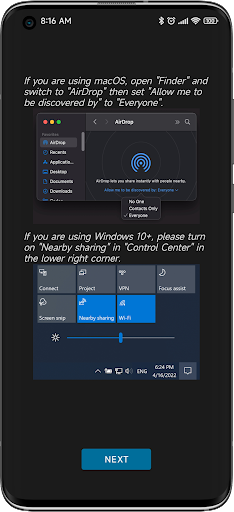
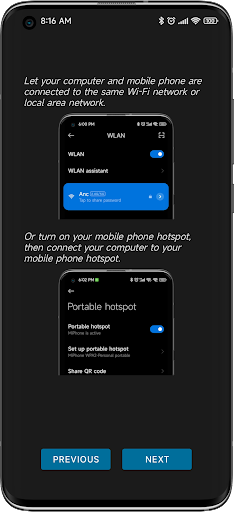
It really works. Shows up as a native airdrop on the Mac without any installation on Mac required. Only caveat is that the Mac must have airdrop set to 'receive from anyone' and must be on the same WiFi network as the phone (you can apparently get around this through connecting Mac to the phone's mobile hotspot but I'm yet to test this). Thank you so much to the devs this is really convenient.
Didn't even work just kept telling me to set it up properly even after I did everything it told me to, couldn't even find any devices at all
It would be great if you could also RECEIVE a file! But this app to SEND file is fantastic...
works well with my Macbook
not working in Monterey
Can we use with AirDrop on iPhone or iPad?
Kirimkan komentar
Untuk memberikan komentar, masuklah dengan jejaring sosial Anda:
Atau tinggalkan komentar anonim. Komentar Anda akan dikirim untuk dimoderasi.
Kirimkan komentar
Untuk memberikan komentar, masuklah dengan jejaring sosial Anda:
Atau tinggalkan komentar anonim. Komentar Anda akan dikirim untuk dimoderasi.