





Ditambahkan: Denis Rubinov
Versi: 6.1.51
Ukuran: 154.9 MB
Diperbarui: 02.02.2024
Developer: Heifeng Zhizao(Shenzhen)Technology Co.,Ltd.
Batasan Usia: Everyone
Otorisasi: 23
Diunduh di Google Play: 1466785
Kategori: Alat
Deskripsi
Aplikasi bebird diperiksa oleh antivirus VirusTotal. Sebagai hasil pemindaian, tidak ada infeksi file yang terdeteksi oleh semua tanda tangan terbaru.
Cara memasang bebird
- Unduh file APK aplikasi dari apkshki.com.
- Temukan file yang diunduh. Anda dapat menemukannya di baki sistem atau di folder 'Download' menggunakan manajer file apa pun.
- Jika file yang diunduh berekstensi .bin (bug WebView di Android 11), ubah namanya menjadi .apk menggunakan pengelola file apa pun atau coba unduh file dengan browser lain seperti Chrome.
- Mulai penginstalan. Klik pada file yang diunduh untuk memulai penginstalan
- Izinkan penginstalan dari sumber yang tidak dikenal. Jika Anda menginstal untuk pertama kalinya bebird bukan dari Google Play, buka pengaturan keamanan perangkat Anda dan izinkan penginstalan dari sumber yang tidak dikenal.
- Lewati perlindungan Google Play. Jika proteksi Google Play memblokir penginstalan file, ketuk 'Info Lebih Lanjut' → 'Tetap instal' → 'OK' untuk melanjutkan..
- Selesaikan penginstalan: Ikuti petunjuk penginstal untuk menyelesaikan proses penginstalan.
Cara memperbarui bebird
- Unduh versi baru aplikasi dari apkshki.com.
- Cari file yang diunduh dan klik file tersebut untuk memulai penginstalan.
- Instal di atas versi lama. Tidak perlu menghapus instalasi versi sebelumnya.
- Hindari konflik tanda tangan. Jika versi sebelumnya tidak diunduh dari apkshki.com, pesan 'Aplikasi tidak terinstal' mungkin muncul. Dalam kasus ini, hapus instalan versi lama dan instal versi baru.
- Mulai ulang lampiran bebird setelah pembaruan.








Meminta pembaruan aplikasi
Ditambahkan Denis Rubinov
Versi: 6.1.51
Ukuran: 154.9 MB
Diperbarui: 02.02.2024
Developer: Heifeng Zhizao(Shenzhen)Technology Co.,Ltd.
Batasan Usia: Everyone
Otorisasi:
Diunduh di Google Play: 1466785
Kategori: Alat















Ulasan untuk bebird
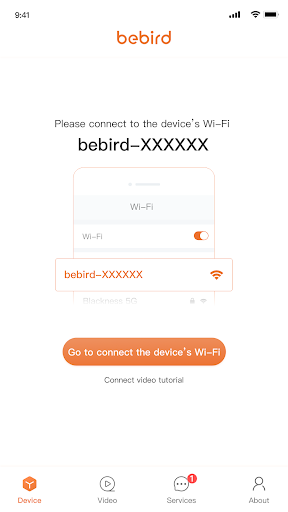
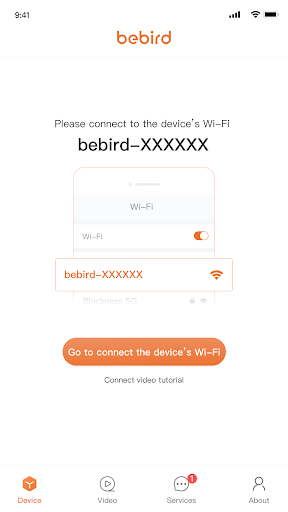
App doesn't work. Though wifi connects to the device, the app never leaves the "connect to device" splash page.
You need to make connecting easier. I have been trying for over a week to figure out how to connect my w3. I'm sick of the connection tutorial failing to even load.
it wouldn't let me connect the wifi
Couldn't connect
It used to connect right away after I switched to the correct WiFi. Now it never connects properly and disconnects constantly. Am probably going to return the device.
I suffer badly from Glue Ear and must clean my ears of wax at least twice a month. I find this tool great for keeping track of the build up so that I am not cleaning when it is not needed. Just remember to link your internet to the Bebird and not your home Wi-Fi else it will not work. You MUST also be careful not to push the tool too far into your ear or else you can cause damage, even perforated your ear drum which will mean hospital treatment. I love this, but it must be used with care.
Won't work
Just Awful - Rarely Connects AND Ads?!
This is not an APP, it's a trap. It seems impossible to gain any information about navigating the app. the way it operates is confusing. For example, when I was typing my reply, I was only able to read the line I was typing. The previous line disappeared. I have never seen that type of process in my thirty years of using the internet, So far, I feel as if I have been screwed. There is no way i see to read the reviews of others. I'm very unhappy.
Can't connect to your apps. Please fix it
Kirimkan komentar
Untuk memberikan komentar, masuklah dengan jejaring sosial Anda:
Atau tinggalkan komentar anonim. Komentar Anda akan dikirim untuk dimoderasi.
Kirimkan komentar
Untuk memberikan komentar, masuklah dengan jejaring sosial Anda:
Atau tinggalkan komentar anonim. Komentar Anda akan dikirim untuk dimoderasi.