



Ditambahkan: Denis Rubinov
Versi: 4.0.0.1065
Ukuran: 1.4 MB
Diperbarui: 29.04.2020
Developer: Glarysoft Ltd
Batasan Usia: Everyone
Kategori: Alat
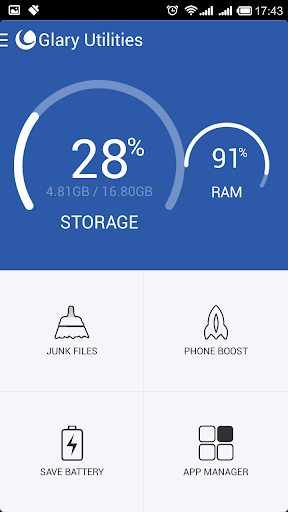
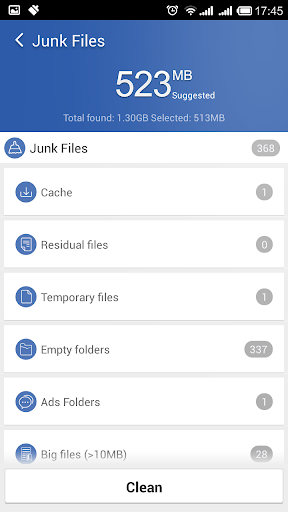
- Membersihkan file sampah dengan cepat.
- Dukungan pembersihan terjadwal.
- Pencopotan aplikasi batch.
- Bekerja di hampir semua versi Android.
Deskripsi
Aplikasi Glary Utilities diperiksa oleh antivirus VirusTotal. Sebagai hasil pemindaian, tidak ada infeksi file yang terdeteksi oleh semua tanda tangan terbaru.
Cara memasang Glary Utilities
- Unduh file APK aplikasi dari apkshki.com.
- Temukan file yang diunduh. Anda dapat menemukannya di baki sistem atau di folder 'Download' menggunakan manajer file apa pun.
- Jika file yang diunduh berekstensi .bin (bug WebView di Android 11), ubah namanya menjadi .apk menggunakan pengelola file apa pun atau coba unduh file dengan browser lain seperti Chrome.
- Mulai penginstalan. Klik pada file yang diunduh untuk memulai penginstalan
- Izinkan penginstalan dari sumber yang tidak dikenal. Jika Anda menginstal untuk pertama kalinya Glary Utilities bukan dari Google Play, buka pengaturan keamanan perangkat Anda dan izinkan penginstalan dari sumber yang tidak dikenal.
- Lewati perlindungan Google Play. Jika proteksi Google Play memblokir penginstalan file, ketuk 'Info Lebih Lanjut' → 'Tetap instal' → 'OK' untuk melanjutkan..
- Selesaikan penginstalan: Ikuti petunjuk penginstal untuk menyelesaikan proses penginstalan.
Cara memperbarui Glary Utilities
- Unduh versi baru aplikasi dari apkshki.com.
- Cari file yang diunduh dan klik file tersebut untuk memulai penginstalan.
- Instal di atas versi lama. Tidak perlu menghapus instalasi versi sebelumnya.
- Hindari konflik tanda tangan. Jika versi sebelumnya tidak diunduh dari apkshki.com, pesan 'Aplikasi tidak terinstal' mungkin muncul. Dalam kasus ini, hapus instalan versi lama dan instal versi baru.
- Mulai ulang lampiran Glary Utilities setelah pembaruan.








Meminta pembaruan aplikasi
Ditambahkan Denis Rubinov
Versi: 4.0.0.1065
Ukuran: 1.4 MB
Diperbarui: 29.04.2020
Developer: Glarysoft Ltd
Batasan Usia: Everyone
Kategori: Alat















Ulasan untuk Glary Utilities
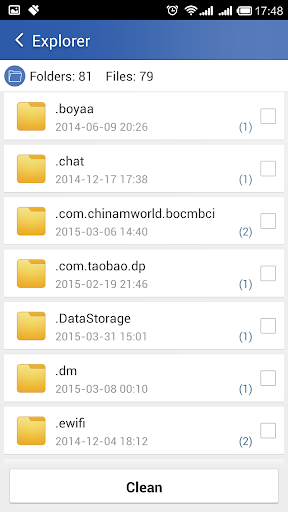
I have the paid desktop version and it's excellent. This app falls extremely short. It scans for empty folders and found 80. It makes me select each one lol. I press clean and it says I need to select items? I just selected 80! App team needs to be fired. If you try the app first you would not get a good impression of the company and therefore would not buy the desktop suite. You are shooting yourself in the foot Glarysoft.
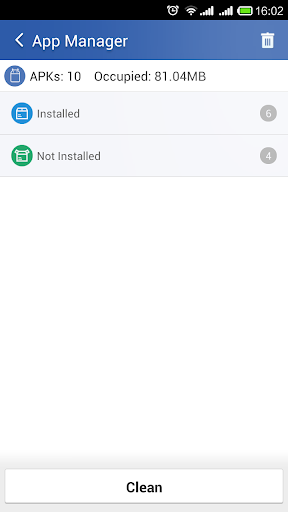
Would not recommend. The windows app is amazing. Leagues ahead of whatever this is supposed to be. The cleaning feature gets stuck on the first file and spins and spins. The app manager just shows my installed apps. When I hit the uninstall nothing happened. There is something called "boost phone" when pressing it, it displayed that my phone was now "boosted". The only thing that happened, for whatever reason my RAM usage skyrocketed. So over all this was a waist of time.
Glary was the best for years on p/c. But this mobile app is garbage. The ease of use is gone. On pc it would find junk files and delete them . The app makes you choose which ones to delete. And most of the files you have no idea what they do. So you could be deleting something important. The amount of tools are reduced drastically as well. I tried it a couple of times and uninstalled it. Now I'm searching for an app that can deliver
This app no longer works at all. Whenever I try to scan for junk, it hangs on scanning a non-existent folder at /storage/emulated/0/DuoKan. When I try to do a phone boost, it tells me "Congratulations, your phone was boosted!" without actually DOING anything. I'm deleting this app until these problems are fixed.
(Galaxy S9) Have been using GU on my three PCs for a very long time, and it works brilliantly, but this Android version is... uninspiring. The interface is bare bones and lacks informative direction, unlike the PC version which has myriad features, info and choices. I don't expect that much depth as in the PC version, but some indication of what has been found and what is happening and a choice of action(s) would make the app much more appealing and user friendly.
This application may only be run on developer's phone. When we scanning junk, it stuck on an non-existing folder/file name (Scanning: /storage/emulated/0/DuoKan). This file/folder not existing in my phone even in hidden form. It's may be a bug. The application I downloaded for junk cleaning, but this main function isn't working/ not useful
Desktop version is great and works like a charm. Mobile version is nothing short of trash! Every time I ran a scan it got stuck! I tried reinstalling it multiple times and the issue still would arise. Awful.
DOESN'T WORK AND REPORTS GET IGNORED. DON'T LOAD IT. DON'T LOAD IT. Despite having reported this app multiple as not working, IT STILL DOESN'T WORK. The app just hangs up on the first checking stage with a spinning wheel. I've run it for two hours and it never progresses. The fault has been reported multiple times, but not yet corrected. No point installing, because it doesn't work at all.
Like everyone says, it doesn't work. Never stops scanning. Even the "Stop" button won't stop the scanning. They obviously don't care about this app anymore. Just take this POS off the store already!
Kirimkan komentar
Untuk memberikan komentar, masuklah dengan jejaring sosial Anda:
Atau tinggalkan komentar anonim. Komentar Anda akan dikirim untuk dimoderasi.
Kirimkan komentar
Untuk memberikan komentar, masuklah dengan jejaring sosial Anda:
Atau tinggalkan komentar anonim. Komentar Anda akan dikirim untuk dimoderasi.