



Ditambahkan: Denis Rubinov
Versi: 4.0.14
Ukuran: 32.5 MB
Diperbarui: 24.06.2025
Developer: Glympse, Inc
Batasan Usia: Everyone
Otorisasi: 20
Diunduh di Google Play: 8990367
Kategori: Sosial
Deskripsi
Aplikasi Glympse - Share GPS location diperiksa oleh antivirus VirusTotal. Sebagai hasil pemindaian, tidak ada infeksi file yang terdeteksi oleh semua tanda tangan terbaru.
Cara memasang Glympse - Share GPS location
- Unduh file APK aplikasi dari apkshki.com.
- Temukan file yang diunduh. Anda dapat menemukannya di baki sistem atau di folder 'Download' menggunakan manajer file apa pun.
- Jika file yang diunduh berekstensi .bin (bug WebView di Android 11), ubah namanya menjadi .apk menggunakan pengelola file apa pun atau coba unduh file dengan browser lain seperti Chrome.
- Mulai penginstalan. Klik pada file yang diunduh untuk memulai penginstalan
- Izinkan penginstalan dari sumber yang tidak dikenal. Jika Anda menginstal untuk pertama kalinya Glympse - Share GPS location bukan dari Google Play, buka pengaturan keamanan perangkat Anda dan izinkan penginstalan dari sumber yang tidak dikenal.
- Lewati perlindungan Google Play. Jika proteksi Google Play memblokir penginstalan file, ketuk 'Info Lebih Lanjut' → 'Tetap instal' → 'OK' untuk melanjutkan..
- Selesaikan penginstalan: Ikuti petunjuk penginstal untuk menyelesaikan proses penginstalan.
Cara memperbarui Glympse - Share GPS location
- Unduh versi baru aplikasi dari apkshki.com.
- Cari file yang diunduh dan klik file tersebut untuk memulai penginstalan.
- Instal di atas versi lama. Tidak perlu menghapus instalasi versi sebelumnya.
- Hindari konflik tanda tangan. Jika versi sebelumnya tidak diunduh dari apkshki.com, pesan 'Aplikasi tidak terinstal' mungkin muncul. Dalam kasus ini, hapus instalan versi lama dan instal versi baru.
- Mulai ulang lampiran Glympse - Share GPS location setelah pembaruan.







Meminta pembaruan aplikasi
Ditambahkan Denis Rubinov
Versi: 4.0.14
Ukuran: 32.5 MB
Diperbarui: 24.06.2025
Developer: Glympse, Inc
Batasan Usia: Everyone
Otorisasi:
Diunduh di Google Play: 8990367
Kategori: Sosial
















Ulasan untuk Glympse - Share GPS location
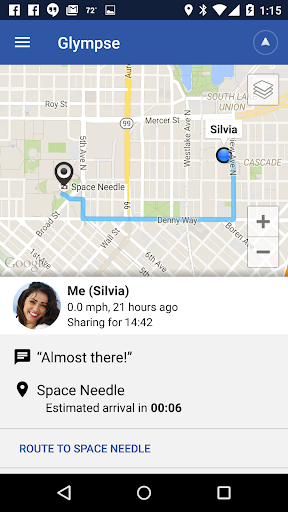
Excellent app, no complaints thus far....! You can't text through the app, but you can share your location with more than one person at a time, which some people might consider a creation of a friends group, in a sense... Also, the different views- street/satellite/terrain and traffic overlay- make for a really awesome feature... I'm not sure if there are any similar apps like this one available, but if there are then they need to offer at least these many features as this app does...
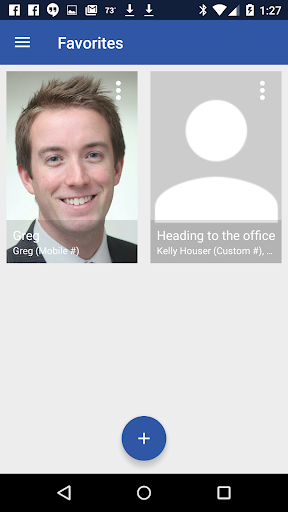
App is useful, but needs a lot of permissions to work. I go back in to settings after each use and turn off permissions, for privacy reasons. After I save a favorite, it continues to ask if I want to save as favorite, which is confusing. Also, if I extend the time to share, it usually automatically reverts back to limited amount of sharing time. Can be confusing if you modify the destination or try to add a recipient after starting the route. With some refinements, it could better.
I used to love the app. However, around when I got the Flip 3 5g, it stopped working correctly. When I try to login, after I enter verification code, nothing happens. Just endless spinning circle. Also, the widgets don't work anymore. Will change review when it works again, if I can wait that long. This has been a problem for a hot minute.
Clunky, no instructions or help. Still playing with it trying to understand how to do things. No clue yet what groups are for or how to use them. Easy to accidentally make a single favorite include multiple contacts, what is the difference? The links it sends to someone often do absolutely nothing. Integration with my car is maddening and worthless, it seems to do almost nothing that you expect. Once in a while the car app will respond, but usually it just sits there like a lump.
It's certainly a useful app. More often than not it's very glitchy. sometimes the speed says I'm going 70 when I'm definitely only going about 45. I've noticed some times that the blue line that follows behind you does not always accurately reflect on the map. I've also noticed that it seems a little bit hard to actually get the group settings to work but that could just be me and my phone and not the app.
Holds it's own with Google Maps- and then some! Thats rare that I find anything close to G-Maps, but this does that and actually leads everybody else in making your location easily accessible through a map screen right in the text window (I am using a Verizon specific texting app, so not sure if everyone else will be as compatible, just to be sure). I like the way it lets you instantly allow someone you are trying to meet up with know exactly where you are and where you are headed in real time.
Something has happened to the app: every time I try to send my location it gives me an error message that it can't find my destination on the map. These are specific destinations I've used many times in the past. I used to use this all the time so friends could track my ETA or family could track my progress on long road trips, but the app isn't finding anything anymore - I just get the error. It's too bad because now I'm going to have to find a new app.
It stopped working on my old phone. I tried to uninstall and reinstall several times without success so I stopped using it. Then I got a new phone and same thing. My friend sends me a link and most of the time it doesn't open, I get a "glimpse has stopped working, send feedback" message or if it does open, it takes me to my location and stops. I tried sharing my location back and it just keeps thinking. I have tried this with various connections in various states. I give up
Initially installed a little over a year ago...it worked great. Didn't use it for awhile. Took a road trip a few days ago and tried to use it but it would immediately close. Just uninstalled and reinstalled it and that seems to have corrected the immediate shutdown problem. Dropped my rating to 3 stars because it quit working for no reason. I'll give it a better rating once if it works after I try to use it again.
A formerly good program that's fallen from glory. Now it runs in the background even when not used, consuming precious ram and cpu trying to connect to something most cars don't even have. It now bugs the hell out of you with notifications about smartlink which is never explained. Now that most of the functionality has been consumed by Google Maps, that's an uninstall for me.
Kirimkan komentar
Untuk memberikan komentar, masuklah dengan jejaring sosial Anda:
Atau tinggalkan komentar anonim. Komentar Anda akan dikirim untuk dimoderasi.
Kirimkan komentar
Untuk memberikan komentar, masuklah dengan jejaring sosial Anda:
Atau tinggalkan komentar anonim. Komentar Anda akan dikirim untuk dimoderasi.