



Ditambahkan: Denis Rubinov
Versi: 5.0
Ukuran: 1.9 MB
Diperbarui: 19.10.2023
Developer: eztools
Batasan Usia: Everyone
Otorisasi: 7
Diunduh di Google Play: 3992473
Kategori: Alat
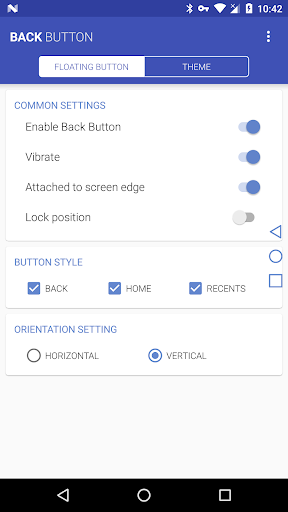
- Seret tombol di sekitar layar.
- Menu dalam bahasa Rusia.
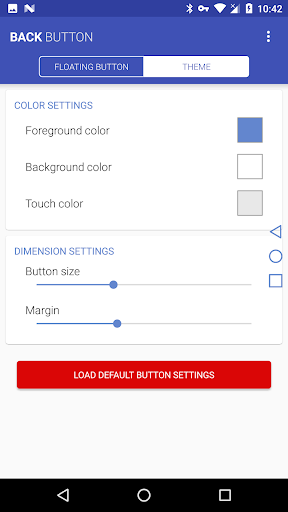
- Kustomisasi desain.
Deskripsi
Aplikasi Back Button diperiksa oleh antivirus VirusTotal. Sebagai hasil pemindaian, tidak ada infeksi file yang terdeteksi oleh semua tanda tangan terbaru.
Cara memasang Back Button
- Unduh file APK aplikasi dari apkshki.com.
- Temukan file yang diunduh. Anda dapat menemukannya di baki sistem atau di folder 'Download' menggunakan manajer file apa pun.
- Jika file yang diunduh berekstensi .bin (bug WebView di Android 11), ubah namanya menjadi .apk menggunakan pengelola file apa pun atau coba unduh file dengan browser lain seperti Chrome.
- Mulai penginstalan. Klik pada file yang diunduh untuk memulai penginstalan
- Izinkan penginstalan dari sumber yang tidak dikenal. Jika Anda menginstal untuk pertama kalinya Back Button bukan dari Google Play, buka pengaturan keamanan perangkat Anda dan izinkan penginstalan dari sumber yang tidak dikenal.
- Lewati perlindungan Google Play. Jika proteksi Google Play memblokir penginstalan file, ketuk 'Info Lebih Lanjut' → 'Tetap instal' → 'OK' untuk melanjutkan..
- Selesaikan penginstalan: Ikuti petunjuk penginstal untuk menyelesaikan proses penginstalan.
Cara memperbarui Back Button
- Unduh versi baru aplikasi dari apkshki.com.
- Cari file yang diunduh dan klik file tersebut untuk memulai penginstalan.
- Instal di atas versi lama. Tidak perlu menghapus instalasi versi sebelumnya.
- Hindari konflik tanda tangan. Jika versi sebelumnya tidak diunduh dari apkshki.com, pesan 'Aplikasi tidak terinstal' mungkin muncul. Dalam kasus ini, hapus instalan versi lama dan instal versi baru.
- Mulai ulang lampiran Back Button setelah pembaruan.








Meminta pembaruan aplikasi
Ditambahkan Denis Rubinov
Versi: 5.0
Ukuran: 1.9 MB
Diperbarui: 19.10.2023
Developer: eztools
Batasan Usia: Everyone
Otorisasi:
Diunduh di Google Play: 3992473
Kategori: Alat
















Ulasan untuk Back Button
Only reason it's 4 stars out of 5 is the the annoying circle button on the bottom. This app has been great, despite all of the youtube videos and other tech help websites i cannot figure out how to turn on the keys on the phone, and this app allows be to go back to the previous pages instead of having to exit out of what I was doing f and start over.
Intrusive with ads, lacking features. I dont like the fact that there is no quick way to hide the button when I am playing horizontal games. Before the ads remove option, the ads are very instrusive and takes up the whole screen, for something that helps me out, it actually got in my way. Other than that, the app does what it says out of the tin. The button styling is nice too with customisation problems.
I was horrified to find Google Pixel's back key is on the left without any option to change it's placement. With this app, i can have it free floating which is quite a good idea as well! Had to pay to get rid of the ads as it will pop up whenever you mistouch it. If the app can switch the original back button to the right, I will award it 5 stars
Good app, have been using it for some weeks now. Works on top of games even in immersive mode, so we can easily navigate (there's no way to stop immersive mode). It'd be nice to have a shortcut to show/hide it, or even better to select it to be visible on specific apps only. It's a bit annoying to have it everywhere, some apps have things I need where I usually have it and i click it accidentally often.
it's simple and works! UPDATE: It's not simple anymore with the latest update that forces you to turn on something called Screen Time which in turn required the permission to track device usage. UPDATE 2: It's also glitchy now! The buttons stopped working except the stupid button which opens Screen Time
Easy to install and use. My new phone is not at all like my old, with the back button the biggest change. I downloaded Back Button and have had zero issues. I am able to enjoy my social media especially without any problems.
Unstable. Several times stopped working until reboot. When I catch the problem the button hangs attached to the screen edge but does not act like back button - only vibrates. I'd like not to post such a review, but I can't exit it using the button (:
My touch buttons(Home, Back and Windows) went out on me out of nowhere. I didnt realize this app existed and was restarting my phone quite a bit just to text back someone or access my email etc etc. Amazing app, saved my phone got sure!
Love this app other than having to move it around so it's not covering part of an article or photo. But that's where the floating feature comes in handy...you can control where the arrow sits. Great job!
Kirimkan komentar
Untuk memberikan komentar, masuklah dengan jejaring sosial Anda:
Atau tinggalkan komentar anonim. Komentar Anda akan dikirim untuk dimoderasi.
Kirimkan komentar
Untuk memberikan komentar, masuklah dengan jejaring sosial Anda:
Atau tinggalkan komentar anonim. Komentar Anda akan dikirim untuk dimoderasi.