



ManyCam - Easy live streaming
12+
unduhan4.4+
versi Android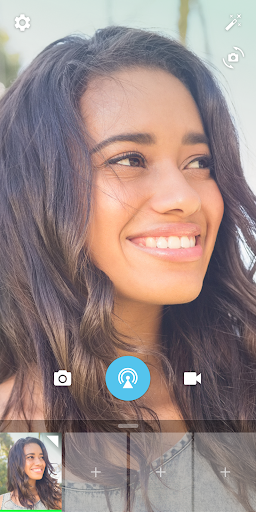
Ditambahkan: Denis Rubinov
Versi: 2.8.1b
Ukuran: 49 MB
Diperbarui: 19.02.2023
Developer: Visicom Media Inc.
Batasan Usia: Teen
Otorisasi: 11
Diunduh di Google Play: 1641071
Kategori: Hiburan
- Tambahkan efek audio dan video.
- Mendukung pengoperasian kamera ponsel cerdas.
- Antarmuka yang intuitif.
- Penyiapan yang mudah.
- Mendukung mode gambar-dalam-gambar.
- Ada terjemahan ke dalam bahasa Rusia.
Deskripsi
Aplikasi ManyCam - Easy live streaming diperiksa oleh antivirus VirusTotal. Sebagai hasil pemindaian, tidak ada infeksi file yang terdeteksi oleh semua tanda tangan terbaru.
Cara memasang ManyCam - Easy live streaming
- Unduh file APK aplikasi dari apkshki.com.
- Temukan file yang diunduh. Anda dapat menemukannya di baki sistem atau di folder 'Download' menggunakan manajer file apa pun.
- Jika file yang diunduh berekstensi .bin (bug WebView di Android 11), ubah namanya menjadi .apk menggunakan pengelola file apa pun atau coba unduh file dengan browser lain seperti Chrome.
- Mulai penginstalan. Klik pada file yang diunduh untuk memulai penginstalan
- Izinkan penginstalan dari sumber yang tidak dikenal. Jika Anda menginstal untuk pertama kalinya ManyCam - Easy live streaming bukan dari Google Play, buka pengaturan keamanan perangkat Anda dan izinkan penginstalan dari sumber yang tidak dikenal.
- Lewati perlindungan Google Play. Jika proteksi Google Play memblokir penginstalan file, ketuk 'Info Lebih Lanjut' → 'Tetap instal' → 'OK' untuk melanjutkan..
- Selesaikan penginstalan: Ikuti petunjuk penginstal untuk menyelesaikan proses penginstalan.
Cara memperbarui ManyCam - Easy live streaming
- Unduh versi baru aplikasi dari apkshki.com.
- Cari file yang diunduh dan klik file tersebut untuk memulai penginstalan.
- Instal di atas versi lama. Tidak perlu menghapus instalasi versi sebelumnya.
- Hindari konflik tanda tangan. Jika versi sebelumnya tidak diunduh dari apkshki.com, pesan 'Aplikasi tidak terinstal' mungkin muncul. Dalam kasus ini, hapus instalan versi lama dan instal versi baru.
- Mulai ulang lampiran ManyCam - Easy live streaming setelah pembaruan.








Meminta pembaruan aplikasi
Ditambahkan Denis Rubinov
Versi: 2.8.1b
Ukuran: 49 MB
Diperbarui: 19.02.2023
Developer: Visicom Media Inc.
Batasan Usia: Teen
Otorisasi:
Diunduh di Google Play: 1641071
Kategori: Hiburan















Ulasan untuk ManyCam - Easy live streaming
Seems to have many less features than it's pc counterpart. The pc version seems to have an audio mixer. I planned on listening to music while using this app - but I can't remove spotify from the audio I produce. I now have to wonder if audio through earbuds will make it to the video or if that's a missing feature too. Will be testing soon.
It's does a great job with preloaded my videos and local images cued up and ready for my streaming. I do wish the developers would make adjustments and add a set timer to switch/cycle between two to three camera shots instead of having to press the screen to switch in the mobile app version. Overall, I love this app! Very easy to navigate through! The emoji are completely messed up! Once you tap on that option, you can't remove any of them from your screen...
I had put a 1 star rating at first after several attempts to contact Manycam they have fixed the issues with my subscription and i have to say i am very impressed with the functionality of the software and I am very happy. It works and is seamless. Note: it worked better for me being tied into my network with a cat5 cable. Since i record and edit prior to broadcasting this option works great for me. But I have used the cellphones as well and there is some latency.
It has lots of potential but when I'm recording my presentation or live streaming the moment I switch to forward facing camera or back to portrait the app crashes. I can't seem to get it to work properly unless I physically turn the camera around. If this gets fixed, it'll used it more often without a doubt.
Nice simple multi source live video streaming app, but it lacks parity with iOS version. Seems to still be a common thing for Android apps. The Android version doesn't have transitions, blank images, or ability to start with back camera. It always starts with front camera. These are in the iOS version. If it's in the iOS app, then it should've been included in the Android version at the same time. Shouldn't have to request these features.
I use the android, iOS and most often Windows version of ManyCam. It was very quick and easy to set up on the fly when our vMix trial expired. We we tried ManyCam because we wanted an app with both mobile and desktop versions. Most of all I have been impressed with the responsiveness and level of support and efficiency turning around beta versions to correct software errors.
Good app, but so many flaws, I bough the premium membership, works good streaming to facebook and youtube from my laptop, but audio doesn't sync, android app lack of some features (unlike Apple). Update: got a new laptop, better especs and everything run smoothly, the software hasn't been updated and effects are old, only a few options for low thirds (let the users upload their own low thirds if you're feeling lazy) I'm recommending this software to my friends but needs some updates
I upgraded to Manycam Studio Lifetime, where's the 4K mobile app feature?? It only allows streaming at 1080 and it's horrible lagging on Facebook. Please add more filters to this mobile app instead of the nonsense distortions, adding: blur screen, beautify, makeup, change background, green screen, low thirds, that'll make this app the best in the market, please make it happen.
Easy to navigate, has fun filters, and offers a solid variety of options to meet the full spectrum of live broadcasting needs.
Kirimkan komentar
Untuk memberikan komentar, masuklah dengan jejaring sosial Anda:
Atau tinggalkan komentar anonim. Komentar Anda akan dikirim untuk dimoderasi.
Kirimkan komentar
Untuk memberikan komentar, masuklah dengan jejaring sosial Anda:
Atau tinggalkan komentar anonim. Komentar Anda akan dikirim untuk dimoderasi.