


Password Manager SafeInCloud 2
1+
unduhan1.0+
versi Android


Ditambahkan: Denis Rubinov
Versi: 25.1.1
Ukuran: 55.6 MB
Diperbarui: 24.06.2025
Developer: SafeInCloud
Batasan Usia: Everyone
Otorisasi: 12
Diunduh di Google Play: 3979445
Kategori: Kerja
Deskripsi
Aplikasi Password Manager SafeInCloud 2 diperiksa oleh antivirus VirusTotal. Sebagai hasil pemindaian, tidak ada infeksi file yang terdeteksi oleh semua tanda tangan terbaru.
Cara memasang Password Manager SafeInCloud 2
- Unduh file APK aplikasi dari apkshki.com.
- Temukan file yang diunduh. Anda dapat menemukannya di baki sistem atau di folder 'Download' menggunakan manajer file apa pun.
- Jika file yang diunduh berekstensi .bin (bug WebView di Android 11), ubah namanya menjadi .apk menggunakan pengelola file apa pun atau coba unduh file dengan browser lain seperti Chrome.
- Mulai penginstalan. Klik pada file yang diunduh untuk memulai penginstalan
- Izinkan penginstalan dari sumber yang tidak dikenal. Jika Anda menginstal untuk pertama kalinya Password Manager SafeInCloud 2 bukan dari Google Play, buka pengaturan keamanan perangkat Anda dan izinkan penginstalan dari sumber yang tidak dikenal.
- Lewati perlindungan Google Play. Jika proteksi Google Play memblokir penginstalan file, ketuk 'Info Lebih Lanjut' → 'Tetap instal' → 'OK' untuk melanjutkan..
- Selesaikan penginstalan: Ikuti petunjuk penginstal untuk menyelesaikan proses penginstalan.
Cara memperbarui Password Manager SafeInCloud 2
- Unduh versi baru aplikasi dari apkshki.com.
- Cari file yang diunduh dan klik file tersebut untuk memulai penginstalan.
- Instal di atas versi lama. Tidak perlu menghapus instalasi versi sebelumnya.
- Hindari konflik tanda tangan. Jika versi sebelumnya tidak diunduh dari apkshki.com, pesan 'Aplikasi tidak terinstal' mungkin muncul. Dalam kasus ini, hapus instalan versi lama dan instal versi baru.
- Mulai ulang lampiran Password Manager SafeInCloud 2 setelah pembaruan.








Meminta pembaruan aplikasi
Ditambahkan Denis Rubinov
Versi: 25.1.1
Ukuran: 55.6 MB
Diperbarui: 24.06.2025
Developer: SafeInCloud
Batasan Usia: Everyone
Otorisasi:
Diunduh di Google Play: 3979445
Kategori: Kerja















Ulasan untuk Password Manager SafeInCloud 2
A few issues worth fixing: 1. Doesn't sync in background, I have to open the app to let the changes in other platforms be reflected. 2. OTP is not copied to clipboard when auto filling in apps, I have to open the app anyways. 3. Would be good to have a better entry to the password generator without having to create a card. But overall it's very good, very competitive pricing compared to Enpass. I'm just hoping it can get better.
Great App!! Been using it for years, and love how it syncs between all our phones and computers. Makes it easy when you can keep all your family and business info in one place, and access from anywhere or device. Even being able to store and organize scans of important docs is a big plus. The couple bucks for the app is a steal considering all it does, and even better, no monthly fees. I'd be lost without it. :)
Needs to auto sync with cloud. I thought it was doing that until my phone needed to be reset to replace a faulty battery. After restoring my phone, I learned that a bunch of passwords were gone. Nowadays everything has auto back up, but I guess with this you have to remember to back up regularly. To top it all off, just tried to export CSV file using pixelbook and it says I need a desktop app to do that. This app was great at one point, but there are better options.
I set up Safe-inCloud on Windows without a problem and set up cloud storage on Dropbox. The program looks great and I expect the app to be just as good. I was able to export my data from an older expired program (Pocket-RIP) very easily. However when setting up the app on my Android phone, it asks for the payment for the Pro version before even syncing my database on Dropbox. The advertised a 2 week trial of the Pro version! I'd like to test it out before paying. 2 stars until they fix this.
There are an amazing number of password manager apps out there. In a world seemingly saturated with slimy characters wanting to steal there way through life, the importance of data protection is simply critical. Accessing your own requires a GREAT tool to protect ALL of your passwords. Simply put, IMO you won't find a better app to manage YOUR world where passwords are concerned. I've used it for a few years now and have been amazed by the functionality since day one! I use it pretty much on a daily basis and highly recommend it.
This is a really good and budget friendly password manager but, I would suggest adding a feature that allows the user to add multiple passwords to their watch at a time instead of adding each individual password. It is very frustrating and time consuming. Not to mention the aggravation when I miss a password and have to go back through them multiple times.
This is the best Android password manager because it works well with autofill and is very light on system resources. Also you pay one time and done. You can download the program on a windows PC for free and sync your phone with it. I have my encrypted passwords on Dropbox but you have other choices as well. It is also updated a lot.
I've been using this password manager for over 10 years and it never fails in addition to that the owner Andrey is very quick to solve any issue you may get. It puts you in total control and is extremely secure. One of the best features is the paid version is only around $7 to automatically sync all your passwords with all your devices and that is done through the cloud storage of your choice. Give it a try you won't be disappointed.
Excellent credentials vault. I upgraded to Pro so I could store unlimited credentials and it is well worth it. I also have custom icons for each of my entries making then very easy to see at a glance. The dynamic search feature is fantastic and fast. This app allow each entry to be organized into multiple categories / labels which is helpful. I would strongly recommend this app to anyone struggling to manage dozens or hundreds of usernames / passwords.
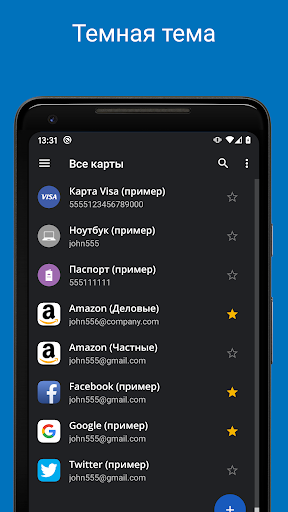
Quite easily the best app I have on my phone. I have used this password manager on all my other devices for over a year and have never encountered any problem. UI is clean and simple. I have recommended this password manager to everyone who has asked about these types of apps, and will continue to do so. Extra extra bonus points for dark mode and browser plugins.
Kirimkan komentar
Untuk memberikan komentar, masuklah dengan jejaring sosial Anda:
Atau tinggalkan komentar anonim. Komentar Anda akan dikirim untuk dimoderasi.
Kirimkan komentar
Untuk memberikan komentar, masuklah dengan jejaring sosial Anda:
Atau tinggalkan komentar anonim. Komentar Anda akan dikirim untuk dimoderasi.