



Ditambahkan: Denis Rubinov
Versi: 1.6.2
Ukuran: 15 MB
Diperbarui: 24.06.2025
Developer: Backslash
Batasan Usia: Everyone
Otorisasi: 7
Diunduh di Google Play: 26559335
Kategori: Hiburan
Deskripsi
Aplikasi TV Remote for Samsung TV diperiksa oleh antivirus VirusTotal. Sebagai hasil pemindaian, tidak ada infeksi file yang terdeteksi oleh semua tanda tangan terbaru.
Cara memasang TV Remote for Samsung TV
- Unduh file APK aplikasi dari apkshki.com.
- Temukan file yang diunduh. Anda dapat menemukannya di baki sistem atau di folder 'Download' menggunakan manajer file apa pun.
- Jika file yang diunduh berekstensi .bin (bug WebView di Android 11), ubah namanya menjadi .apk menggunakan pengelola file apa pun atau coba unduh file dengan browser lain seperti Chrome.
- Mulai penginstalan. Klik pada file yang diunduh untuk memulai penginstalan
- Izinkan penginstalan dari sumber yang tidak dikenal. Jika Anda menginstal untuk pertama kalinya TV Remote for Samsung TV bukan dari Google Play, buka pengaturan keamanan perangkat Anda dan izinkan penginstalan dari sumber yang tidak dikenal.
- Lewati perlindungan Google Play. Jika proteksi Google Play memblokir penginstalan file, ketuk 'Info Lebih Lanjut' → 'Tetap instal' → 'OK' untuk melanjutkan..
- Selesaikan penginstalan: Ikuti petunjuk penginstal untuk menyelesaikan proses penginstalan.
Cara memperbarui TV Remote for Samsung TV
- Unduh versi baru aplikasi dari apkshki.com.
- Cari file yang diunduh dan klik file tersebut untuk memulai penginstalan.
- Instal di atas versi lama. Tidak perlu menghapus instalasi versi sebelumnya.
- Hindari konflik tanda tangan. Jika versi sebelumnya tidak diunduh dari apkshki.com, pesan 'Aplikasi tidak terinstal' mungkin muncul. Dalam kasus ini, hapus instalan versi lama dan instal versi baru.
- Mulai ulang lampiran TV Remote for Samsung TV setelah pembaruan.





Meminta pembaruan aplikasi
Ditambahkan Denis Rubinov
Versi: 1.6.2
Ukuran: 15 MB
Diperbarui: 24.06.2025
Developer: Backslash
Batasan Usia: Everyone
Otorisasi:
Diunduh di Google Play: 26559335
Kategori: Hiburan
















Ulasan untuk TV Remote for Samsung TV
So far this app has been a life saver. Recently purchased a Samsung Smart TV and my remote had to be defective...the volume up worked but not the volume down unless I pressed a button on the tv and a button on the remote simultaneously. Channel up and down quit working as well as the numbers on one side...UGH!!! A friend told me about this app and it has worked perfectly so far!! Thank you!!
Works like a charm, easy to sync up, just had to allow connection on my tv and it works perfectly. I run my sound through a soundbar that works on my regular tv remote's volume and mute buttons but i haven't been able to figure out how to transfer that capability to this apps remote. Other than that, works perfectly and powers on the tv even when the tv is off.
I've been using this app for long time, worked great. Then suddenly stopped connecting to my TV right after the last update. I was gonna switch to another similar app, but this one started work with my TV after few days of my editing review. It works great again!! So I'm back to this app again. Thanks!!
Contrary to what you see in some other posts, this app totally works fine as of December 2021. The one-star reviews about an update that "broke the app" did no such thing - probably some settings got added that needed attention. Anyway, I installed the app, it immediately discovered and attempted to sync up to my Samsung 2019-era TV. I had to click "accept" on the Samsung remote, and just like that, I have the entire remote on my Samsung phone. All buttons and features work perfectly.
Excellent remote app! At your first attempt to connect you have to manually hit the enter button on the bottom of the Samsung TV to allow the connection (if the request pops up on the TV screen, that is), but after that the connection remains stable, and best of all - NO ADS!! It's perfect! If you have trouble keeping it connected and it always asks you to allow the connection on the TV, go to Settings, General, Device Connection Manager, edit the list & delete them ALL! Now connect & it works!
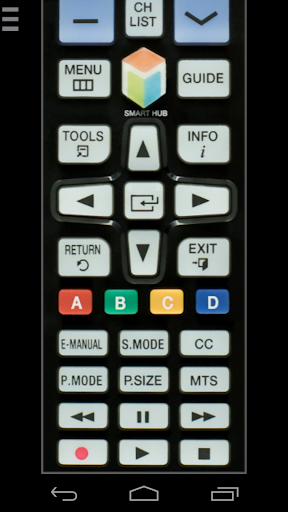
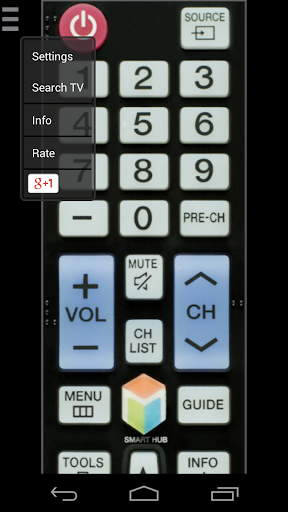
Literally worked within 15 seconds on my samsung 70", 55", and 42" smart tvs. Absolutely love the ease of use and the fact it mirrors the original remote perfectly. The touch points are mapped nicely so you don't "fat finger" multiple buttons at once. The size of the interface is great and the scroll works well to navigate from the top of the remote to the bottom to use all the buttons. If I had to find a criticism it would be that there is fractional input lag but that is just splitting hairs.
Download this app if you need a remote for your TV. Seriously. This one is the only good one that doesn't lock you behind a paywall. Functions very well and connected smoothly to my TV. Only note is I wish there was an update that more closely resembles the current remote with fewer buttons. It's small design makes it very intuitive and user friendly for this era of smart tv and it would be nice to see that more closely emulated.
You know. For whatever reason, my actual remote takes forever to turn the TV on. This app saved me from getting an Alexa or a Chromecast to get around the issue of my TV being difficult to turn on. It kinda sucks that you will have to grant it permission all the time to use it regularly which would be no good if you lost your real remote. Luckily, that isn't the case if you only need to turn the TV on like me.
It purposely advertises as a replacement if the remote is missing or is out of batteries. In order for it to work, I need to be connected to the same wifi, which is fine. The main problem is the TV needs to be ON. WHY. If I lost the remote, you think I'm gonna run up to the TV hanging on the wall each time to turn it on and use the app? I can't even find the buttons to turn it on! Otherwise the app works great.
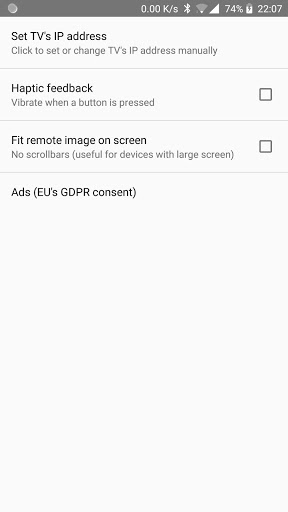
If you don't know your IP address to your TV download the app Fing. It connects to your wifi and tells you all the devices. As for this remote app, I find it works significantly better than other apps I've tried. Being connected to the IP address seems to work better than other apps that connect through wifi. I haven't had issues yet with the remote not responding.
Kirimkan komentar
Untuk memberikan komentar, masuklah dengan jejaring sosial Anda:
Atau tinggalkan komentar anonim. Komentar Anda akan dikirim untuk dimoderasi.
Kirimkan komentar
Untuk memberikan komentar, masuklah dengan jejaring sosial Anda:
Atau tinggalkan komentar anonim. Komentar Anda akan dikirim untuk dimoderasi.