




Ditambahkan: Denis Rubinov
Versi: 4.8.2
Ukuran: 10.8 MB
Diperbarui: 04.02.2024
Developer: artemkaxboy
Batasan Usia: Everyone
Otorisasi: 11
Diunduh di Google Play: 2673770
Kategori: Alat
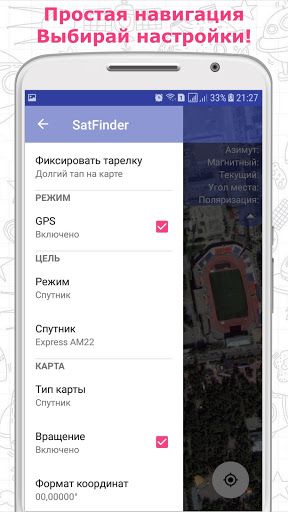
- Dapat bekerja tanpa GPS.
- Telusuri menurut satelit atau arah.
- Pilih dari 4 jenis kartu.
- Tidak ada iklan.
Deskripsi
Aplikasi Satfinder (Dish Pointer) diperiksa oleh antivirus VirusTotal. Sebagai hasil pemindaian, tidak ada infeksi file yang terdeteksi oleh semua tanda tangan terbaru.
Cara memasang Satfinder (Dish Pointer)
- Unduh file APK aplikasi dari apkshki.com.
- Temukan file yang diunduh. Anda dapat menemukannya di baki sistem atau di folder 'Download' menggunakan manajer file apa pun.
- Jika file yang diunduh berekstensi .bin (bug WebView di Android 11), ubah namanya menjadi .apk menggunakan pengelola file apa pun atau coba unduh file dengan browser lain seperti Chrome.
- Mulai penginstalan. Klik pada file yang diunduh untuk memulai penginstalan
- Izinkan penginstalan dari sumber yang tidak dikenal. Jika Anda menginstal untuk pertama kalinya Satfinder (Dish Pointer) bukan dari Google Play, buka pengaturan keamanan perangkat Anda dan izinkan penginstalan dari sumber yang tidak dikenal.
- Lewati perlindungan Google Play. Jika proteksi Google Play memblokir penginstalan file, ketuk 'Info Lebih Lanjut' → 'Tetap instal' → 'OK' untuk melanjutkan..
- Selesaikan penginstalan: Ikuti petunjuk penginstal untuk menyelesaikan proses penginstalan.
Cara memperbarui Satfinder (Dish Pointer)
- Unduh versi baru aplikasi dari apkshki.com.
- Cari file yang diunduh dan klik file tersebut untuk memulai penginstalan.
- Instal di atas versi lama. Tidak perlu menghapus instalasi versi sebelumnya.
- Hindari konflik tanda tangan. Jika versi sebelumnya tidak diunduh dari apkshki.com, pesan 'Aplikasi tidak terinstal' mungkin muncul. Dalam kasus ini, hapus instalan versi lama dan instal versi baru.
- Mulai ulang lampiran Satfinder (Dish Pointer) setelah pembaruan.








Meminta pembaruan aplikasi
Ditambahkan Denis Rubinov
Versi: 4.8.2
Ukuran: 10.8 MB
Diperbarui: 04.02.2024
Developer: artemkaxboy
Batasan Usia: Everyone
Otorisasi:
Diunduh di Google Play: 2673770
Kategori: Alat















Ulasan untuk Satfinder (Dish Pointer)
For the USA customers, HughesNet, and Echostar 19 are essential, but missing. Otherwise, it works just like all the other apps, nothing special. A suoerb app would guide through dish installation in a step by step process.
Set it up for astra2 , aligned the lnb along the red line and using some identifying points on the map managed to hit the target first time. Great for touring as can set up in couple of minutes.
The old version was great when you could visualize obstacles in the path of the satellite. Now it just gives a compass direction.
one of rhe best app so far and the only one which which links you to the frequency charts direct Bravo. I have been looking forward for such great app thankyou.
If you set up VSAT terminals, this is THE app to have! So useful!! I like that it gives both true and magnetic azimuth, something so many pointing apps lack. Also the map view with directional line is so much more practical than all the apps that use camera view to show 'where' the satellite is because that is all dependent on the GPS compass being accurate/calibrated when so often it isn't. And the fact that I can get pointing angles for locations other than where I'm actually standing is icing on the cake. The only thing I could ask for is the ability to cache the Google map so I can use the satellite view when I don't have a data connection. Thanks so much for this app! Worth every penny. BTW, I train customers to use our company's VSAT terminal and I always recommend this app to them.
Before Apps like this it was a real pain setting up Sat Dishes, Using lousey field strength meters with a tone that indicated something was there. It was a game of blind man's bluff. This App is great, it takes all the guesswork out of setting up both C and KU dishes. I have both and using a protractor and compass its easy to use the data to preset positions prior to fine tuning. :)
Great App it works I now have Freesat in stead of pay monthly contract which was very expensive . All you do is buy a satellite dish from Amazon and follow the instructions I had it working in about 15min after using this App. When you use the App there is a red line on the map and that tells you were to point your dish and that is your starting point.
so far so good, not been pestered with ads yet and appears to be accurate, because I know exactly where my astra satellite is and this app has pointed straight to it. I want to be able to use the app away from home. This will be the test I need to perform, then I will return to change to 5 stars if successful
Incredible app. Automatically identifies your location, and graphically shows the appropriate sat pointing. Unbelievably fast and perfectly accurate. Highly recommended!!
app is satisfactory needs more settings info like dish angle picture setting and azimuth picture setting and lnb picture setting otherwise it's just a guide not a complete operation.
Kirimkan komentar
Untuk memberikan komentar, masuklah dengan jejaring sosial Anda:
Atau tinggalkan komentar anonim. Komentar Anda akan dikirim untuk dimoderasi.
Kirimkan komentar
Untuk memberikan komentar, masuklah dengan jejaring sosial Anda:
Atau tinggalkan komentar anonim. Komentar Anda akan dikirim untuk dimoderasi.