






Ditambahkan: Denis Rubinov
Versi: 24
Ukuran: 4.5 MB
Diperbarui: 12.05.2020
Developer: Éric ALBER
Batasan Usia: Everyone
Diunduh di Google Play: 562790
Kategori: Kerja
Deskripsi
Aplikasi Sweech - Wifi File Transfer diperiksa oleh antivirus VirusTotal. Sebagai hasil pemindaian, tidak ada infeksi file yang terdeteksi oleh semua tanda tangan terbaru.
Cara memasang Sweech - Wifi File Transfer
- Unduh file APK aplikasi dari apkshki.com.
- Temukan file yang diunduh. Anda dapat menemukannya di baki sistem atau di folder 'Download' menggunakan manajer file apa pun.
- Jika file yang diunduh berekstensi .bin (bug WebView di Android 11), ubah namanya menjadi .apk menggunakan pengelola file apa pun atau coba unduh file dengan browser lain seperti Chrome.
- Mulai penginstalan. Klik pada file yang diunduh untuk memulai penginstalan
- Izinkan penginstalan dari sumber yang tidak dikenal. Jika Anda menginstal untuk pertama kalinya Sweech - Wifi File Transfer bukan dari Google Play, buka pengaturan keamanan perangkat Anda dan izinkan penginstalan dari sumber yang tidak dikenal.
- Lewati perlindungan Google Play. Jika proteksi Google Play memblokir penginstalan file, ketuk 'Info Lebih Lanjut' → 'Tetap instal' → 'OK' untuk melanjutkan..
- Selesaikan penginstalan: Ikuti petunjuk penginstal untuk menyelesaikan proses penginstalan.
Cara memperbarui Sweech - Wifi File Transfer
- Unduh versi baru aplikasi dari apkshki.com.
- Cari file yang diunduh dan klik file tersebut untuk memulai penginstalan.
- Instal di atas versi lama. Tidak perlu menghapus instalasi versi sebelumnya.
- Hindari konflik tanda tangan. Jika versi sebelumnya tidak diunduh dari apkshki.com, pesan 'Aplikasi tidak terinstal' mungkin muncul. Dalam kasus ini, hapus instalan versi lama dan instal versi baru.
- Mulai ulang lampiran Sweech - Wifi File Transfer setelah pembaruan.








Meminta pembaruan aplikasi
Ditambahkan Denis Rubinov
Versi: 24
Ukuran: 4.5 MB
Diperbarui: 12.05.2020
Developer: Éric ALBER
Batasan Usia: Everyone
Diunduh di Google Play: 562790
Kategori: Kerja
















Ulasan untuk Sweech - Wifi File Transfer
I have a Galaxy Perx J7 which won't transfer files over USB using Windows 10. I got tired of pulling my hair out and purchased this app. I used the HTTPS transfer protocol. At first, I couldn't figure out how to do group file transfers from my phone to my pc, but watch the video here from the developer and it becomes pretty clear. One thing was confusing. I couldn't tell if enabling https disabled the http port, and I would hope it did, but it wasn't clear. The app is not scammy or shady in any way, which can't be said for a lot of apps on the app store. No hidden agendas here, light on permissions, does what it says, no clutter, no fat. Well done!
I thought I had found a great app! BUT! .......I accidentally clicked on delete and it deleted all videos on the phone. No caution or second warning asking me "do I really want to delete multiple videos". And once the deletion process started there was no way to stop until all videos were gone. Shame, shame, shame on the developer! Yes it was my fault and we all make mistakes and in this case, as far as I am concerned, the developer made a huge one!
BEST WIFI FILE TRANSFER APP IN THE WORLD!!! I have bought premium version of Air Droid and Wifi File Transfer Pro. The free version of this app is more stable and does more than those apps combined!!! This is an expert developer who knows this file transfer domain very well. No hang-ups, no freezing, perfect robust connection and transfer!!! Highly recommend this app over everything else out there!
Simple clean design that's a plus for me but you can only download one file at a time or all files at once, there is no way to just select a few files. That's a ding. Also, when you try and select a file it attempts to open the file in the browser!? It wouldn't be that bad, but it's too slow to open it. My intention for this app is wireless transfer, not a player. Another ding. I need an app that I can select several files click download and regardless of how long it takes, the quicker the better, of course, should just do that. I appreciate that it depends on the size of the files but this should be able to be accomplished with just a few clicks and that just wasn't my experience. I should be able to select a few files click download and save where I want them to go, but this app doesn't seem able to do that simple task. This app is a "Nope" for me.
The premium version is quite a disappointment, for two reasons: 1. You can not display the password after you set it. This is necessary if you use a complex password. And no, that would not be a security risk, the standard android Hotspot / Tethering tool can display your password. If your threat model includes the attacker being on your phone and able to read the configuration of other apps, securing your Sweech connection is a moot point. 2. You can't generate, or at least insert, a certificate for HTTPS. That means you have to deal with warnings and exceptions every time you open the url in your browser. The two remaining stars are for the ease of use and the great UI. This is about the only app that serves a good looking page to the browser.
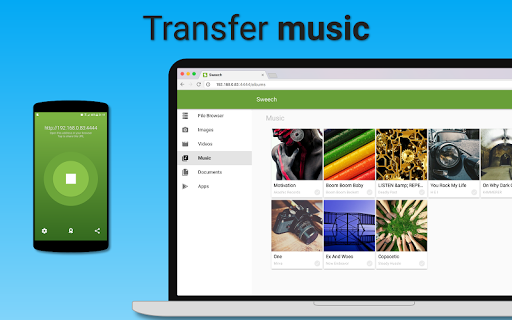
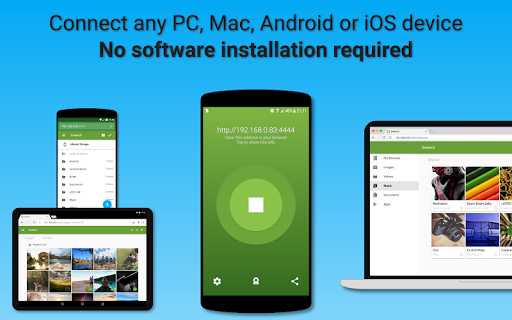
I have to transfer files between my pc and my mobile a lot and I was looking for an alternative to the data cable. This app made my work easier. Nice and clean UI. I love it. I did not have to create an account or install any extra software in my pc to transfer files. And also playing musics & videos and viewing photos on pc from my mobile phone without transferring them is a plus point. But I find the transfer rate bit slow. Faster transfer rate would be great.
Absolutely amazing, this is exactly what I wanted. However, when file manager apps goes in to "selecting" mode, usually all the items default to the "not selected" state and you have to manually select items you actually want to do whatever you want to do. Not in this app however, and this inconsistency has caused me to unintentionally delete 26 gb of data. I thought I was removing a single folder but turns out I was removing everything but that one folder. Frankly, not a big deal. No valuable data was lost. But I am sure this is something to consider. Besides this, everything is perfect as far as I am concerned,
Incredible App! Very nice interface. Awesome speed. And I wanted alternative for the Data cable. Just one touch on Phone. And few numbers on web browser address bar, that's it. Your are connected to your phone. Thank you so much Team. You can transfer it as much as you have Battery left in your phone. No need to keep your phone near PC/System. You can even use your data also while transferring. Best App for Data transfer I ever seen. And not a single AD. Once again thank you so much. ❤️
I just wanted to select and send a specific file via WiFi to PC through the "Share" interface and this app does it. EasyShare is bugged for me for some reason. This app is what y'all need. Edit: I wish I could give more stars! Selecting multiple files and sharing lets you download them as zipped! Loving the simplicity of this app.
Kirimkan komentar
Untuk memberikan komentar, masuklah dengan jejaring sosial Anda:
Atau tinggalkan komentar anonim. Komentar Anda akan dikirim untuk dimoderasi.
Kirimkan komentar
Untuk memberikan komentar, masuklah dengan jejaring sosial Anda:
Atau tinggalkan komentar anonim. Komentar Anda akan dikirim untuk dimoderasi.