




Ditambahkan: Denis Rubinov
Versi: 1.0.15
Ukuran: 24.1 MB
Diperbarui: 03.02.2024
Developer: Voicemod
Batasan Usia: Everyone
Diunduh di Google Play: 1288999
Kategori: Hiburan
Deskripsi
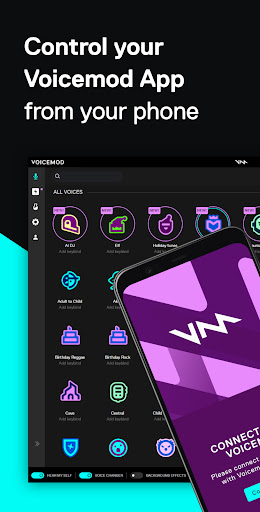
Aplikasi Voicemod Desktop Controller diperiksa oleh antivirus VirusTotal. Sebagai hasil pemindaian, tidak ada infeksi file yang terdeteksi oleh semua tanda tangan terbaru.
Cara memasang Voicemod Desktop Controller
- Unduh file APK aplikasi dari apkshki.com.
- Temukan file yang diunduh. Anda dapat menemukannya di baki sistem atau di folder 'Download' menggunakan manajer file apa pun.
- Jika file yang diunduh berekstensi .bin (bug WebView di Android 11), ubah namanya menjadi .apk menggunakan pengelola file apa pun atau coba unduh file dengan browser lain seperti Chrome.
- Mulai penginstalan. Klik pada file yang diunduh untuk memulai penginstalan
- Izinkan penginstalan dari sumber yang tidak dikenal. Jika Anda menginstal untuk pertama kalinya Voicemod Desktop Controller bukan dari Google Play, buka pengaturan keamanan perangkat Anda dan izinkan penginstalan dari sumber yang tidak dikenal.
- Lewati perlindungan Google Play. Jika proteksi Google Play memblokir penginstalan file, ketuk 'Info Lebih Lanjut' → 'Tetap instal' → 'OK' untuk melanjutkan..
- Selesaikan penginstalan: Ikuti petunjuk penginstal untuk menyelesaikan proses penginstalan.
Cara memperbarui Voicemod Desktop Controller
- Unduh versi baru aplikasi dari apkshki.com.
- Cari file yang diunduh dan klik file tersebut untuk memulai penginstalan.
- Instal di atas versi lama. Tidak perlu menghapus instalasi versi sebelumnya.
- Hindari konflik tanda tangan. Jika versi sebelumnya tidak diunduh dari apkshki.com, pesan 'Aplikasi tidak terinstal' mungkin muncul. Dalam kasus ini, hapus instalan versi lama dan instal versi baru.
- Mulai ulang lampiran Voicemod Desktop Controller setelah pembaruan.








Meminta pembaruan aplikasi
Ditambahkan Denis Rubinov
Versi: 1.0.15
Ukuran: 24.1 MB
Diperbarui: 03.02.2024
Developer: Voicemod
Batasan Usia: Everyone
Diunduh di Google Play: 1288999
Kategori: Hiburan















Ulasan untuk Voicemod Desktop Controller
easy to usr
One version for mobile and let's say I'd be happy to rate 5 stars.
I'm a funnyguy
Works, easy to use,straight forward, how it should be. @dev -can't wait Developers constantly adding new voices and sound boards, hilarious new fart and burp sound board, that doesn't use the generic sounds that you hear everywhere else. 10/10 believable during a game.
Don't spend your time downloading voice-mod so when I got the app I thought there would be free voices to use but you literally have to have a computer and there's no other mod so just don't download this 😡👎 I wish I can get voice-mod a 0 star
It refuses to acknowledge my headphones. I try to fix it but it refuses. I wasted so damn much money on this... should have just used something else or just stayed free...
please make an app for mobile , tablets plss we need this on mobile and tablets pls voicemod
Why does Voice app need camera access?
We all don't have the same way to connect to internet. Some use Hotspot from mobile to computer, Use Ethernet way.. I subscribe 3 Months for Voicemod.. now I feel sad. Well I can only use in PC. This app is waste
Is not working and it's getting annoying so this sucks
Kirimkan komentar
Untuk memberikan komentar, masuklah dengan jejaring sosial Anda:
Atau tinggalkan komentar anonim. Komentar Anda akan dikirim untuk dimoderasi.
Kirimkan komentar
Untuk memberikan komentar, masuklah dengan jejaring sosial Anda:
Atau tinggalkan komentar anonim. Komentar Anda akan dikirim untuk dimoderasi.