


Blackr: OLED Screen Off
0+
unduhan5.0+
versi Android
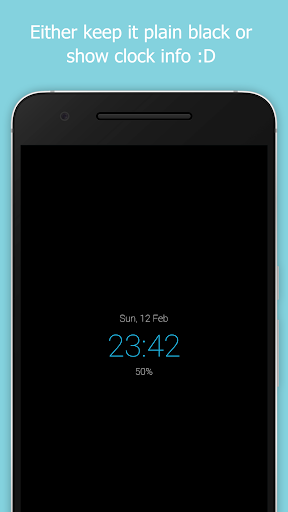
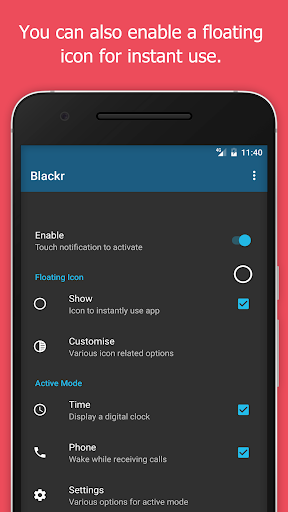


Ditambahkan: Denis Rubinov
Versi: 8.5
Ukuran: 6.2 MB
Diperbarui: 24.06.2025
Developer: Neximo Labs
Batasan Usia: Everyone
Otorisasi: 4
Diunduh di Google Play: 566223
Kategori: Alat
Deskripsi
Aplikasi Blackr: OLED Screen Off diperiksa oleh antivirus VirusTotal. Sebagai hasil pemindaian, tidak ada infeksi file yang terdeteksi oleh semua tanda tangan terbaru.
Cara memasang Blackr: OLED Screen Off
- Unduh file APK aplikasi dari apkshki.com.
- Temukan file yang diunduh. Anda dapat menemukannya di baki sistem atau di folder 'Download' menggunakan manajer file apa pun.
- Jika file yang diunduh berekstensi .bin (bug WebView di Android 11), ubah namanya menjadi .apk menggunakan pengelola file apa pun atau coba unduh file dengan browser lain seperti Chrome.
- Mulai penginstalan. Klik pada file yang diunduh untuk memulai penginstalan
- Izinkan penginstalan dari sumber yang tidak dikenal. Jika Anda menginstal untuk pertama kalinya Blackr: OLED Screen Off bukan dari Google Play, buka pengaturan keamanan perangkat Anda dan izinkan penginstalan dari sumber yang tidak dikenal.
- Lewati perlindungan Google Play. Jika proteksi Google Play memblokir penginstalan file, ketuk 'Info Lebih Lanjut' → 'Tetap instal' → 'OK' untuk melanjutkan..
- Selesaikan penginstalan: Ikuti petunjuk penginstal untuk menyelesaikan proses penginstalan.
Cara memperbarui Blackr: OLED Screen Off
- Unduh versi baru aplikasi dari apkshki.com.
- Cari file yang diunduh dan klik file tersebut untuk memulai penginstalan.
- Instal di atas versi lama. Tidak perlu menghapus instalasi versi sebelumnya.
- Hindari konflik tanda tangan. Jika versi sebelumnya tidak diunduh dari apkshki.com, pesan 'Aplikasi tidak terinstal' mungkin muncul. Dalam kasus ini, hapus instalan versi lama dan instal versi baru.
- Mulai ulang lampiran Blackr: OLED Screen Off setelah pembaruan.


Wave - Customizable Lock scree
Personalisasi
Canyon - Lock Screen
Personalisasi
Touch Lock - screen lock
Personalisasi
Lollipop Lockscreen Android L
Personalisasi

Ava Lockscreen
Personalisasi

Lock Screen iOS 15
Personalisasi
LockScreen Phone XS - Notification
Personalisasi
iNotify - OS Lock Screen
Personalisasi
Meminta pembaruan aplikasi
Ditambahkan Denis Rubinov
Versi: 8.5
Ukuran: 6.2 MB
Diperbarui: 24.06.2025
Developer: Neximo Labs
Batasan Usia: Everyone
Otorisasi:
Diunduh di Google Play: 566223
Kategori: Alat















Ulasan untuk Blackr: OLED Screen Off
I must admit, this app being updated to reenable it's functionality pleasantly surprised me. Few people typically come back to things that are scrapped, so it was a refreshing change of pace, especially since this one of the few apps on the play store that does this. I did notice it works differently with Google apps now, the status bar gets dimmed. Overall, this app performs better than before, and it is really nice to see something get put back in action. Thanks for bringing this back, dev!
Very well done. Versatile for different use cases, looks neat & clean. Acts neat & clean. No ads, as it should be. And the pro features make sense as pro features. All very well done. Also, and very importantly: no unnecessary permissions (none at all if you don't need the phone wake up feature). P.S. I would love an option to add this as a Screen Saver too. With different configuration (A Screen Saver is an Android). For example: With clock normally & without as screen saver.
This is literally the best app for its use. you have everything you need from turning it on from anywhere to great customization. However, I would like it if i could stop the on screen animations but i think they are there so that the screen doesn't turn off. Overall, you should download it! ( Edit : thanks for bringing it back, thank you so much)
Please help, worked perfect for couple days and now the bar at the top of my s10 still shows the time,some of the running apps wifi signal and battery. Also shows touch keys at the bottom. Before it covered everything and was perfect. I would pay for this app if it was still working. Please get back to me if there's a fix.
I would like to use this app, but it seems that the status bar and navigation bar won't get covered by the overlay, which beats the purpose. Am I missing something here? Is there a setting in the app or in Android that I can change to make it work? I need it for google maps so that the screen wouldn't get burnt in while using navigation for hours at a time. I like the fact that you can turn the screen back on with one tap or a swipe, but I also have a suggestion for a feature - Doesn't fit sorry
Not helpful. Using it for a purpose and that purpose is still not defeated. No option to disable notification panel and icons and navigation bars when using this app. What's the point of using this app when some sort of distraction is there? Also no option for unlocking like a lock only touch which happens a lot of time accidentally. Also app closes when app is closed from history. Stay active in background or notification panel. Improve in 2022.
Worked perfectly on Samsung Galaxy Note 3 with android 7.1 (lineage OS 14.1). I updated today to android 9.0 (lineage OS 16), and the app now crashes as soon as I try to enable the service in the settings. Update: still doesn't work with version 6.2 uninstalling/reinstalling doesn't help. A similar app (black me) does work though, so not an OS issue.
P.S. after a while it works a little, then stops & goes back to settings again! need my suggestions below + this bug fix. Older REVIEW: BEST. Needs 5th widget so clicking clock returns to Android desktop instead of balckr settings. Or an option in settings to do so!
Burn in is a major concern for me. As long as blackr is running, the Android status/system bar is still visible on the screen. In a static state, of course.
Kirimkan komentar
Untuk memberikan komentar, masuklah dengan jejaring sosial Anda:
Atau tinggalkan komentar anonim. Komentar Anda akan dikirim untuk dimoderasi.
Kirimkan komentar
Untuk memberikan komentar, masuklah dengan jejaring sosial Anda:
Atau tinggalkan komentar anonim. Komentar Anda akan dikirim untuk dimoderasi.