



Design Space: DIY with Cricut
0+
unduhan9+
versi Android
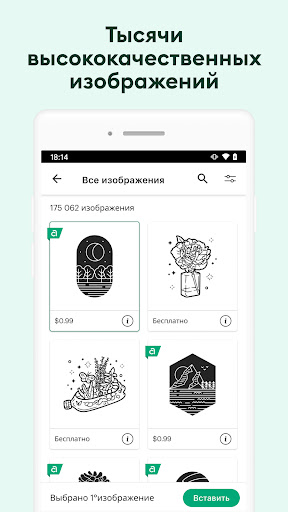
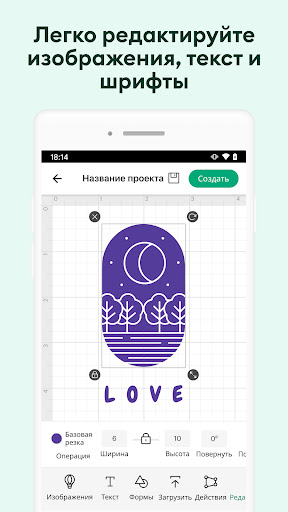
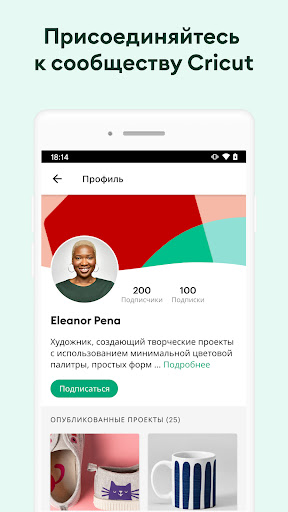
Ditambahkan: Denis Rubinov
Versi: 6.12.0
Ukuran: 1185.9 MB
Diperbarui: 24.06.2025
Developer: Cricut
Batasan Usia: Everyone
Diunduh di Google Play: 4266318
Kategori: Gaya hidup
Deskripsi
Aplikasi Design Space: DIY with Cricut diperiksa oleh antivirus VirusTotal. Sebagai hasil pemindaian, tidak ada infeksi file yang terdeteksi oleh semua tanda tangan terbaru.
Cara memasang Design Space: DIY with Cricut
- Unduh file APK aplikasi dari apkshki.com.
- Temukan file yang diunduh. Anda dapat menemukannya di baki sistem atau di folder 'Download' menggunakan manajer file apa pun.
- Jika file yang diunduh berekstensi .bin (bug WebView di Android 11), ubah namanya menjadi .apk menggunakan pengelola file apa pun atau coba unduh file dengan browser lain seperti Chrome.
- Mulai penginstalan. Klik pada file yang diunduh untuk memulai penginstalan
- Izinkan penginstalan dari sumber yang tidak dikenal. Jika Anda menginstal untuk pertama kalinya Design Space: DIY with Cricut bukan dari Google Play, buka pengaturan keamanan perangkat Anda dan izinkan penginstalan dari sumber yang tidak dikenal.
- Lewati perlindungan Google Play. Jika proteksi Google Play memblokir penginstalan file, ketuk 'Info Lebih Lanjut' → 'Tetap instal' → 'OK' untuk melanjutkan..
- Selesaikan penginstalan: Ikuti petunjuk penginstal untuk menyelesaikan proses penginstalan.
Cara memperbarui Design Space: DIY with Cricut
- Unduh versi baru aplikasi dari apkshki.com.
- Cari file yang diunduh dan klik file tersebut untuk memulai penginstalan.
- Instal di atas versi lama. Tidak perlu menghapus instalasi versi sebelumnya.
- Hindari konflik tanda tangan. Jika versi sebelumnya tidak diunduh dari apkshki.com, pesan 'Aplikasi tidak terinstal' mungkin muncul. Dalam kasus ini, hapus instalan versi lama dan instal versi baru.
- Mulai ulang lampiran Design Space: DIY with Cricut setelah pembaruan.







Meminta pembaruan aplikasi
Ditambahkan Denis Rubinov
Versi: 6.12.0
Ukuran: 1185.9 MB
Diperbarui: 24.06.2025
Developer: Cricut
Batasan Usia: Everyone
Diunduh di Google Play: 4266318
Kategori: Gaya hidup















Ulasan untuk Design Space: DIY with Cricut
I am learning so much everyday!
The only reason for the one star is because you can't leave a review with zero stars. I hadn't used it in a while. When I got on my Chromebook the other day it wouldn't let me log into my account and wouldn't send a password recovery to my gmail. So, I had to uninstall the app and reinstall it just to find out that it no longer works with my chromebook. It also does not work properly on my phone. Not only can I no longer use my cricut but I lost everything I ever bought or saved. Very sad!
This app cannot be installed on my tablet.
Ive just started so I have a learning curve but as I learn more the more I love it. I especially love the video tutorials. I love the tutorials and I utilize YT, TikTok and Google to help.
Easy to work with!!
Paid for subscription 2 days ago showing on my bank account but still no access ...maddening as I have stuff to do.
Best Machine and software ever.. 4 years later no complaints ♥️
Works great.
I love this phone app.I can pick my designs and send them to my cricut via Bluetooth and have it ready for me when I get home
Great product after being very intimidated I finally tried it and love my Maker 3.
Kirimkan komentar
Untuk memberikan komentar, masuklah dengan jejaring sosial Anda:
Atau tinggalkan komentar anonim. Komentar Anda akan dikirim untuk dimoderasi.
Kirimkan komentar
Untuk memberikan komentar, masuklah dengan jejaring sosial Anda:
Atau tinggalkan komentar anonim. Komentar Anda akan dikirim untuk dimoderasi.