



Ditambahkan: Denis Rubinov
Versi: 11.6.0
Ukuran: 148.7 MB
Diperbarui: 24.06.2025
Developer: Home Connect GmbH
Otorisasi: 15
Diunduh di Google Play: 2969239
Kategori: Gaya hidup
Deskripsi
Aplikasi Home Connect diperiksa oleh antivirus VirusTotal. Sebagai hasil pemindaian, tidak ada infeksi file yang terdeteksi oleh semua tanda tangan terbaru.
Cara memasang Home Connect
- Unduh file APK aplikasi dari apkshki.com.
- Temukan file yang diunduh. Anda dapat menemukannya di baki sistem atau di folder 'Download' menggunakan manajer file apa pun.
- Jika file yang diunduh berekstensi .bin (bug WebView di Android 11), ubah namanya menjadi .apk menggunakan pengelola file apa pun atau coba unduh file dengan browser lain seperti Chrome.
- Mulai penginstalan. Klik pada file yang diunduh untuk memulai penginstalan
- Izinkan penginstalan dari sumber yang tidak dikenal. Jika Anda menginstal untuk pertama kalinya Home Connect bukan dari Google Play, buka pengaturan keamanan perangkat Anda dan izinkan penginstalan dari sumber yang tidak dikenal.
- Lewati perlindungan Google Play. Jika proteksi Google Play memblokir penginstalan file, ketuk 'Info Lebih Lanjut' → 'Tetap instal' → 'OK' untuk melanjutkan..
- Selesaikan penginstalan: Ikuti petunjuk penginstal untuk menyelesaikan proses penginstalan.
Cara memperbarui Home Connect
- Unduh versi baru aplikasi dari apkshki.com.
- Cari file yang diunduh dan klik file tersebut untuk memulai penginstalan.
- Instal di atas versi lama. Tidak perlu menghapus instalasi versi sebelumnya.
- Hindari konflik tanda tangan. Jika versi sebelumnya tidak diunduh dari apkshki.com, pesan 'Aplikasi tidak terinstal' mungkin muncul. Dalam kasus ini, hapus instalan versi lama dan instal versi baru.
- Mulai ulang lampiran Home Connect setelah pembaruan.








Meminta pembaruan aplikasi
Ditambahkan Denis Rubinov
Versi: 11.6.0
Ukuran: 148.7 MB
Diperbarui: 24.06.2025
Developer: Home Connect GmbH
Otorisasi:
Diunduh di Google Play: 2969239
Kategori: Gaya hidup















Ulasan untuk Home Connect
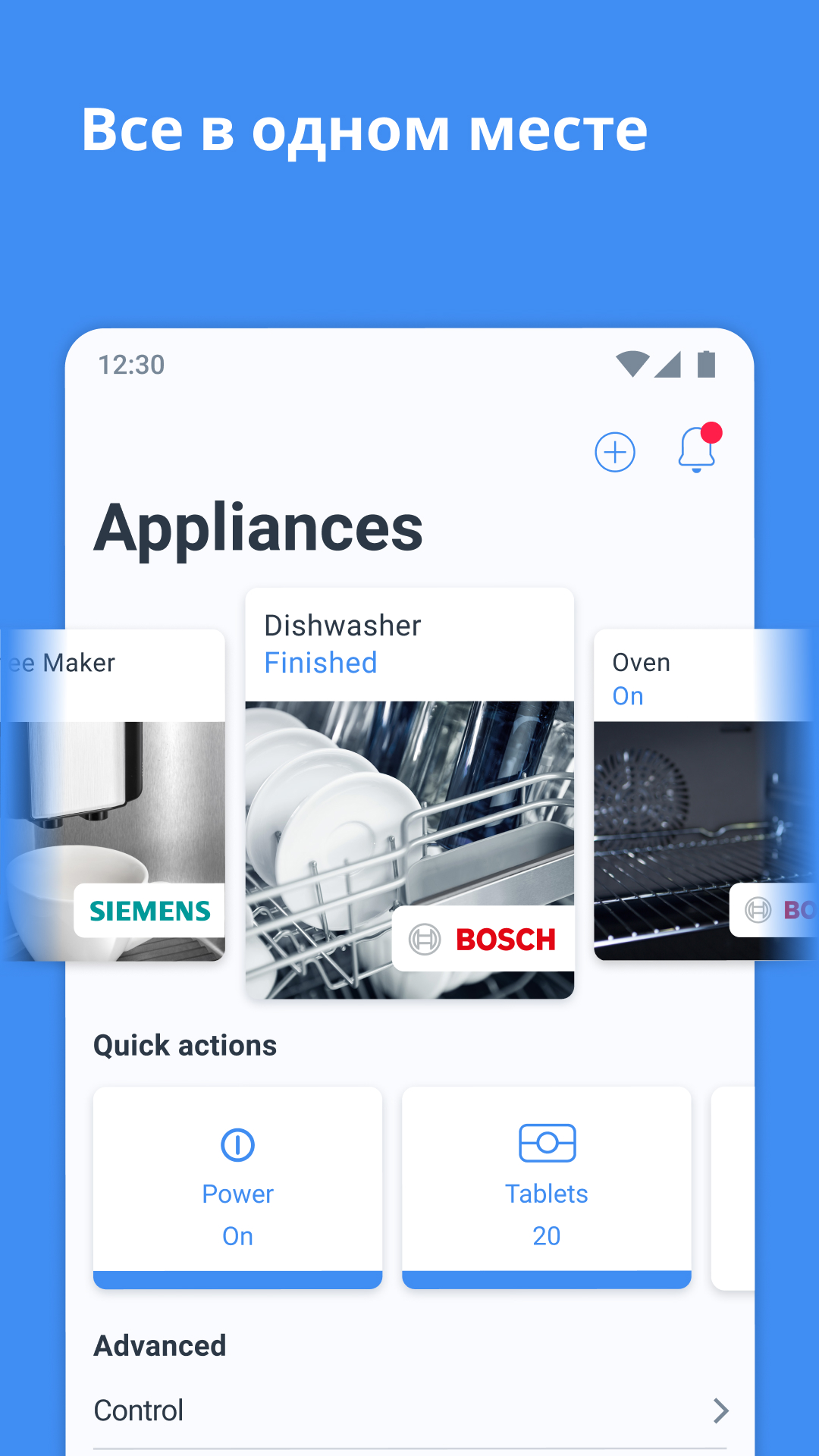
tab counter in the real last version of the home connect Android application has disappeared. But I still see it in the advertisement pictures, very strange.
Good app, and I was every excited with the tab counter feature. It seems it was removed recently though. Please put it back
Using it for 2 months! Great connectivity and interesting app! Keep up the good work
would give it a 5 star, but as they removed the tablet counter which notified me that I need to buy more tables and I didn't need to worry, The one of the useful features they removed it, sad.
My wife bought á Bluetooth thermometer from Siemens. In the history of terrible appliances, this musts be the winner. There is no way to operate it without this terrible app which for some reason is stuck on Fahrenheit and two frantic menu diving sessions have not yet resolved it. This kit will soon become electronic waste. Even Jucero, an epic failure sounds better than this junk.
Great app
great app, I'm using it for my dishwasher but why tablet counter disappeared from quick action tab?
Great app, but it should be allowed to change units. Gallons to Liters ;) You can if system language is English United Kingdom, from English United States
works ok, but can disconnect from the app
Very, very bad application. Disconnecting after every washing cycle. Useless app 👎
Hi! Have been using for a month or so with my Pixel 7 and Series 6 dishwasher, but suddenly notifications stopped coming and I couldn't connect to the appliance anymore. Did a factory reset on dishwasher, BT reset on my phone, cache clean, app uninstall - didn't help -same error on and on. When I find the appliance and try to connect to it, Bluetooth Connectivity Error shows and Retry button but it does not work on retry either. Checked on old Pixel 3XL and it works perfectly. Please help..
After last update cant connect the dishwasher machine anymore
Doesn't work with Siemens oven MB578G5.6B. OK pairing process though it took a while. But once connected, it doesn't actually work. Reporting the state of the oven - doesn't update unless I edit the app or display page and go back in. But all UI is disabled/greyed out - I can't even select which oven to view. All control settings are disabled (have tried both manual and permanent options on the oven), so it is completely non-functional - I can't control or even view the status reliably.
Full of bugs... I almost always have to set the temperature after starting the washing program... For some reasons, even if I set temp to 40 in wizard, the stupid app thinks that "cold" is better. This is happening foe years. To bad I can not give negative rating... The most frustrating app I hav ever used...
Fantastic! 21st century experience
Kirimkan komentar
Untuk memberikan komentar, masuklah dengan jejaring sosial Anda:
Atau tinggalkan komentar anonim. Komentar Anda akan dikirim untuk dimoderasi.
Kirimkan komentar
Untuk memberikan komentar, masuklah dengan jejaring sosial Anda:
Atau tinggalkan komentar anonim. Komentar Anda akan dikirim untuk dimoderasi.