





Ditambahkan: Denis Rubinov
Versi: 1.6.0.1
Ukuran: 1.8 MB
Diperbarui: 29.09.2020
Developer: Shinycore
Batasan Usia: Teen
Diunduh di Google Play: 50950357
Kategori: Foto
Deskripsi
Aplikasi PicSay - Photo Editor diperiksa oleh antivirus VirusTotal. Sebagai hasil pemindaian, tidak ada infeksi file yang terdeteksi oleh semua tanda tangan terbaru.
Cara memasang PicSay - Photo Editor
- Unduh file APK aplikasi dari apkshki.com.
- Temukan file yang diunduh. Anda dapat menemukannya di baki sistem atau di folder 'Download' menggunakan manajer file apa pun.
- Jika file yang diunduh berekstensi .bin (bug WebView di Android 11), ubah namanya menjadi .apk menggunakan pengelola file apa pun atau coba unduh file dengan browser lain seperti Chrome.
- Mulai penginstalan. Klik pada file yang diunduh untuk memulai penginstalan
- Izinkan penginstalan dari sumber yang tidak dikenal. Jika Anda menginstal untuk pertama kalinya PicSay - Photo Editor bukan dari Google Play, buka pengaturan keamanan perangkat Anda dan izinkan penginstalan dari sumber yang tidak dikenal.
- Lewati perlindungan Google Play. Jika proteksi Google Play memblokir penginstalan file, ketuk 'Info Lebih Lanjut' → 'Tetap instal' → 'OK' untuk melanjutkan..
- Selesaikan penginstalan: Ikuti petunjuk penginstal untuk menyelesaikan proses penginstalan.
Cara memperbarui PicSay - Photo Editor
- Unduh versi baru aplikasi dari apkshki.com.
- Cari file yang diunduh dan klik file tersebut untuk memulai penginstalan.
- Instal di atas versi lama. Tidak perlu menghapus instalasi versi sebelumnya.
- Hindari konflik tanda tangan. Jika versi sebelumnya tidak diunduh dari apkshki.com, pesan 'Aplikasi tidak terinstal' mungkin muncul. Dalam kasus ini, hapus instalan versi lama dan instal versi baru.
- Mulai ulang lampiran PicSay - Photo Editor setelah pembaruan.








Meminta pembaruan aplikasi
Ditambahkan Denis Rubinov
Versi: 1.6.0.1
Ukuran: 1.8 MB
Diperbarui: 29.09.2020
Developer: Shinycore
Batasan Usia: Teen
Diunduh di Google Play: 50950357
Kategori: Foto
















Ulasan untuk PicSay - Photo Editor
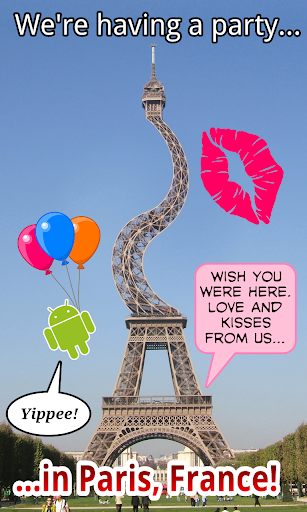
I've used this app for several years with hardly any problems on several different phones. It's been a great tool to add readable text to photos to help explain and ask questions efficiently. However, I can't get it to open and be usable on a pixel. Any advice and/or fixes would be awesome. I really miss being able to use it for the past several months.🥺
This used to be a great app, but there were revisions and newer versions. Some of yhe updates were incompatible. Hope they make some improvements. I love this apps. In Android Version 10, the app has problem in some of the +/- selection slide, I hope they resolve this. Their are some annoying adds. I would love to go into details. its hard typing on a phone and I dont have a laptop.
I have been using this for years. After no updates for a long time it finally no longer functions on my phone, can't add an image in. Unfortunately nothing matches the amount of fine tuning I could pull off with this app. Especially with blending images
I am the first artist in the world to create a 40-minute animation movie through the full animation program picsaypro, but there is a legitimate defect. I must add a brush that colors anything I chose completely. If this defect is modified, it will become the best program in Android. Please add Brush, with one click, colors anything I mean auto pill colour 😎
The easiest, most useful way to add simple graphics and text to any pictures. I've been using the pro for years, and it stays updated, and solid. Highly recommended, if this is what you need.
I like this app. The one thing I was was different is the mask effect. I wish there was a way to save it or something and not lose it if you click on something else by mistake. If they fixed that then boom best app ever.
A must have app for photo editors who work on mobiles, though small in size but great in work, for 7 years I m using this app and it never let me down, a true mobile photo shop, very easy & useful.I m using pro version which loaded with more amazing options than free one.
I love this app and it has helped me lots on my comic strip works. I only would like if the dialogue circles could be edited smaller so they'd fit the words and image space. Other than that, it's simply amazing app
Incredible. The ads are small and unobtrusive. No nagging to review or buy pro version. I've been so happy with the free, and use it so much, that I said "ok I'll support" and bought pro. Hopefully it's as good free :P
Kirimkan komentar
Untuk memberikan komentar, masuklah dengan jejaring sosial Anda:
Atau tinggalkan komentar anonim. Komentar Anda akan dikirim untuk dimoderasi.
Kirimkan komentar
Untuk memberikan komentar, masuklah dengan jejaring sosial Anda:
Atau tinggalkan komentar anonim. Komentar Anda akan dikirim untuk dimoderasi.