






Ditambahkan: Denis Rubinov
Versi: 1.4.1
Ukuran: 7.1 MB
Diperbarui: 02.06.2020
Developer: mjagielski
Batasan Usia: Everyone
Otorisasi: 6
Diunduh di Google Play: 142782
Kategori: Foto
Deskripsi
Aplikasi SKRWT diperiksa oleh antivirus VirusTotal. Sebagai hasil pemindaian, tidak ada infeksi file yang terdeteksi oleh semua tanda tangan terbaru.
Cara memasang SKRWT
- Unduh file APK aplikasi dari apkshki.com.
- Temukan file yang diunduh. Anda dapat menemukannya di baki sistem atau di folder 'Download' menggunakan manajer file apa pun.
- Jika file yang diunduh berekstensi .bin (bug WebView di Android 11), ubah namanya menjadi .apk menggunakan pengelola file apa pun atau coba unduh file dengan browser lain seperti Chrome.
- Mulai penginstalan. Klik pada file yang diunduh untuk memulai penginstalan
- Izinkan penginstalan dari sumber yang tidak dikenal. Jika Anda menginstal untuk pertama kalinya SKRWT bukan dari Google Play, buka pengaturan keamanan perangkat Anda dan izinkan penginstalan dari sumber yang tidak dikenal.
- Lewati perlindungan Google Play. Jika proteksi Google Play memblokir penginstalan file, ketuk 'Info Lebih Lanjut' → 'Tetap instal' → 'OK' untuk melanjutkan..
- Selesaikan penginstalan: Ikuti petunjuk penginstal untuk menyelesaikan proses penginstalan.
Cara memperbarui SKRWT
- Unduh versi baru aplikasi dari apkshki.com.
- Cari file yang diunduh dan klik file tersebut untuk memulai penginstalan.
- Instal di atas versi lama. Tidak perlu menghapus instalasi versi sebelumnya.
- Hindari konflik tanda tangan. Jika versi sebelumnya tidak diunduh dari apkshki.com, pesan 'Aplikasi tidak terinstal' mungkin muncul. Dalam kasus ini, hapus instalan versi lama dan instal versi baru.
- Mulai ulang lampiran SKRWT setelah pembaruan.

Google Photos
Foto

Funimate Video Editor & Maker
Pemutar & Editor Video

Scribbl - Photo & Video Effect
Seni dan Desain

Slideshow Maker, Video Editor
Pemutar & Editor Video

Pixel Camera
Foto

DOUPAI - DOUPAI Face
Foto

Face Live Camera: Face Filters
Foto

PowerDirector - Video Editor
Pemutar & Editor Video
Meminta pembaruan aplikasi
Ditambahkan Denis Rubinov
Versi: 1.4.1
Ukuran: 7.1 MB
Diperbarui: 02.06.2020
Developer: mjagielski
Batasan Usia: Everyone
Otorisasi:
Diunduh di Google Play: 142782
Kategori: Foto















Ulasan untuk SKRWT
Clumsy and clunky to use... Flow is NOT intuitive at all!
Unique app.
Nice features. But this app does not preserve the exif data and messes it up. for example, it changes the date and time, disregards location data etc. It's quite important thing for a photo. And when I edit the pictures, it saves to the new picture to the time I current time I edited in the gallery and not to the time the photo was taken. But this is not a problem with app for example snapseed. The edited photo will be next to the original one. Dev, please give an update to preserve the data.
YESS U FIXED IT 💥 BEST APP UNDER SUN
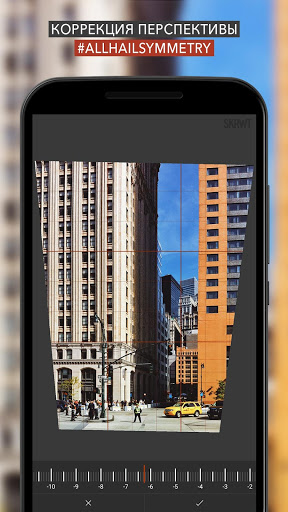
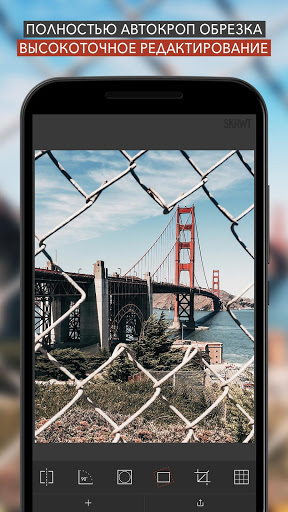
Really good app for editing photographs, particularly perspective. I've found the results excellent and it preserves file dimensions really well.
I love it so far! Worth every penny. Thankyou
I've used this app on my Note 3 and my Note 8. It does exactly what you want it to do. You can eliminate lens distortion. There is always a give and take, though. Corrections on the edges will cause you to lose some of the picture, but that can't be helped. I just upgraded my phone to a Galaxy Z Fold 4. The app is phenomenal on it!
Love it and works great! I do wish I could make presets so that I can apple it to multiple images.
The app is good, but there is no option to apply the same lens distortion correction (or any other effect) on multiple pictures. That feature can be very useful.
This is a fantastic editing tool. If you take pictures of buildings, just as an example, it will solve the problem of parallax correction quickly and in was most users will find intuitive. If there's a full copy that does more than the evaluation copy I think I have, I'll buy it.
Kirimkan komentar
Untuk memberikan komentar, masuklah dengan jejaring sosial Anda:
Atau tinggalkan komentar anonim. Komentar Anda akan dikirim untuk dimoderasi.
Kirimkan komentar
Untuk memberikan komentar, masuklah dengan jejaring sosial Anda:
Atau tinggalkan komentar anonim. Komentar Anda akan dikirim untuk dimoderasi.