


Gravity Screen - On/Off
3+
unduhan4.1+
versi Android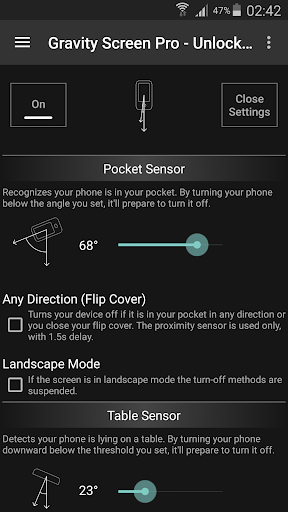

Ditambahkan: Denis Rubinov
Versi: 3.32.0.0
Ukuran: 2.7 MB
Diperbarui: 20.12.2021
Developer: Plexnor
Batasan Usia: Everyone
Otorisasi: 12
Diunduh di Google Play: 5311702
Kategori: Alat
Deskripsi
Aplikasi Gravity Screen - On/Off diperiksa oleh antivirus VirusTotal. Sebagai hasil pemindaian, tidak ada infeksi file yang terdeteksi oleh semua tanda tangan terbaru.
Cara memasang Gravity Screen - On/Off
- Unduh file APK aplikasi dari apkshki.com.
- Temukan file yang diunduh. Anda dapat menemukannya di baki sistem atau di folder 'Download' menggunakan manajer file apa pun.
- Jika file yang diunduh berekstensi .bin (bug WebView di Android 11), ubah namanya menjadi .apk menggunakan pengelola file apa pun atau coba unduh file dengan browser lain seperti Chrome.
- Mulai penginstalan. Klik pada file yang diunduh untuk memulai penginstalan
- Izinkan penginstalan dari sumber yang tidak dikenal. Jika Anda menginstal untuk pertama kalinya Gravity Screen - On/Off bukan dari Google Play, buka pengaturan keamanan perangkat Anda dan izinkan penginstalan dari sumber yang tidak dikenal.
- Lewati perlindungan Google Play. Jika proteksi Google Play memblokir penginstalan file, ketuk 'Info Lebih Lanjut' → 'Tetap instal' → 'OK' untuk melanjutkan..
- Selesaikan penginstalan: Ikuti petunjuk penginstal untuk menyelesaikan proses penginstalan.
Cara memperbarui Gravity Screen - On/Off
- Unduh versi baru aplikasi dari apkshki.com.
- Cari file yang diunduh dan klik file tersebut untuk memulai penginstalan.
- Instal di atas versi lama. Tidak perlu menghapus instalasi versi sebelumnya.
- Hindari konflik tanda tangan. Jika versi sebelumnya tidak diunduh dari apkshki.com, pesan 'Aplikasi tidak terinstal' mungkin muncul. Dalam kasus ini, hapus instalan versi lama dan instal versi baru.
- Mulai ulang lampiran Gravity Screen - On/Off setelah pembaruan.





Meminta pembaruan aplikasi
Ditambahkan Denis Rubinov
Versi: 3.32.0.0
Ukuran: 2.7 MB
Diperbarui: 20.12.2021
Developer: Plexnor
Batasan Usia: Everyone
Otorisasi:
Diunduh di Google Play: 5311702
Kategori: Alat















Ulasan untuk Gravity Screen - On/Off
EDIT: Android 12 update does not play well with it. Phone runs like a sloth when it's active, but pausing it, everything is fine again. Needs an update. Tried uninstalling and reinstalling, and the fingerprint lock kept popping up; had to completely uninstall for now. Still a great app I've used for years, but unfortunately, Samsung Note 10+ has locked down the proximity sensor for use outside of its own system. So this app is only mostly useful now without it, sadly.
Like it, but it keeps vibrating my phone everytime I unlock it or go into apps that are excluded and not excluded. Wish I could turn that feature off but couldn't figure it out. It's not the OS settings because I scoured through everything and tested it. It's the app itself. I tried toggling the notification from it to 'off' but still it does not work. I'm almost at the point of uninstalling it because of how annoying it is.
Works most of the time. However, I have a samsung a10e and sometimes, when the phone goes to sleep, it does not wake up by motion or angle. Instead, I need to press the power button. May be a slight glitch, but this is not a significant enough issue not download this app or uninstall. The benefit of the app is 99 percent of not having to use the button.
If your phone's power button is broken, don't waste any time, get this app. It's an absolute life saver. It's VERY simple and straightforward, anyone could get use out of it. Default settings work perfectly fine for me. The one "issue" I've had with it is that it doesn't exactly support fingerprint scanners. There's an option to enable such support, but I've found it doesn't actually turn off the display or lock my phone.
It's great! The only problem I have with it is that it drains my battery faster then I would like. It doesnt drain it fast enough to notice unless your very close to your phone all day but it does drain. Other then that it works just as it says! If it's not working you just have to readjust the settings but this app is amazing since I broke my power button 😅.
So much for having to press the power button to wake up our phones from sleep or to double tap the screen like in competing apps. All you have to do with this is pick the phone up. Also turns off the screen automatically when you lay it on a table, put it in a purse or pocket or close the flap on a case. Installed it in both of our Motorola Moto Z3 phones. Too easy!
It's a must have app for me. Prevents the phone from launching apps, making calls or sending texts, etc. while it's in my pocket. It's easy to use and easy to change the settings. The developer is on top of changes and new OS versions from the various phone manufacturers / carriers and updates the app often.
Well thought out, professionally designed app which is pretty much bug-free. This does the things you ask it to and then leaves you alone. The lock / sleep / power button is probably the first thing to fail on many ohones. Hiw many moving parts does a phone have? 😂 When that happens this app can be a game changer. Good job.
Brilliant upgrade for my budget phone. My power button was acting up, so I wanted a way to minimize its use. This app does what I wanted. The screen comes on when I pick up the phone or even nudge it. With my settings, the screen goes off when I set the phone face down or place it upside down in my pocket. Thank you.
Update; love the app but since last update has developed conflicts with other apps and is killing the battery. Previous; Great app! It's one of my favorite and most used apps--4+ stars! Developer has been extremely responsive in working with me to resolve issues caused by recent device (Samsung Galaxy S9+) upgrade to Android 10. The upgrade has limited a few features of the app, otherwise, it would get 5 stars.
Kirimkan komentar
Untuk memberikan komentar, masuklah dengan jejaring sosial Anda:
Atau tinggalkan komentar anonim. Komentar Anda akan dikirim untuk dimoderasi.
Kirimkan komentar
Untuk memberikan komentar, masuklah dengan jejaring sosial Anda:
Atau tinggalkan komentar anonim. Komentar Anda akan dikirim untuk dimoderasi.