



Ditambahkan: Denis Rubinov
Versi: 7.1.3
Ukuran: 1.3 MB
Diperbarui: 15.10.2023
Developer: zenofx.com
Batasan Usia: Everyone
Diunduh di Google Play: 1665746
Kategori: Kerja
Deskripsi
Aplikasi PrintBot diperiksa oleh antivirus VirusTotal. Sebagai hasil pemindaian, tidak ada infeksi file yang terdeteksi oleh semua tanda tangan terbaru.
Cara memasang PrintBot
- Unduh file APK aplikasi dari apkshki.com.
- Temukan file yang diunduh. Anda dapat menemukannya di baki sistem atau di folder 'Download' menggunakan manajer file apa pun.
- Jika file yang diunduh berekstensi .bin (bug WebView di Android 11), ubah namanya menjadi .apk menggunakan pengelola file apa pun atau coba unduh file dengan browser lain seperti Chrome.
- Mulai penginstalan. Klik pada file yang diunduh untuk memulai penginstalan
- Izinkan penginstalan dari sumber yang tidak dikenal. Jika Anda menginstal untuk pertama kalinya PrintBot bukan dari Google Play, buka pengaturan keamanan perangkat Anda dan izinkan penginstalan dari sumber yang tidak dikenal.
- Lewati perlindungan Google Play. Jika proteksi Google Play memblokir penginstalan file, ketuk 'Info Lebih Lanjut' → 'Tetap instal' → 'OK' untuk melanjutkan..
- Selesaikan penginstalan: Ikuti petunjuk penginstal untuk menyelesaikan proses penginstalan.
Cara memperbarui PrintBot
- Unduh versi baru aplikasi dari apkshki.com.
- Cari file yang diunduh dan klik file tersebut untuk memulai penginstalan.
- Instal di atas versi lama. Tidak perlu menghapus instalasi versi sebelumnya.
- Hindari konflik tanda tangan. Jika versi sebelumnya tidak diunduh dari apkshki.com, pesan 'Aplikasi tidak terinstal' mungkin muncul. Dalam kasus ini, hapus instalan versi lama dan instal versi baru.
- Mulai ulang lampiran PrintBot setelah pembaruan.



Meminta pembaruan aplikasi
Ditambahkan Denis Rubinov
Versi: 7.1.3
Ukuran: 1.3 MB
Diperbarui: 15.10.2023
Developer: zenofx.com
Batasan Usia: Everyone
Diunduh di Google Play: 1665746
Kategori: Kerja















Ulasan untuk PrintBot
**Edit: you do need to get a paid versin for this to work fully. they give you 3 free prints then start outting big watermarks all over your pages for every print after that. App still works well. I guess nothing good is free** After searching forever for a free App/Plugin to work for my static IP address (non wifi) printer, this is the only one that worked without any gimmicks or BE to make you sign uo for premium just to print. This worked on my Brother OKI C610 colour laser. Thank you!
The said "- Free version allows printing of 3 images or PDF documents per month (after that, a watermark is added on each page). PDFs are restricted to 3 pages" Im getting a comment at the end of the page staying that it was printed with printbot!
Works with my old USB printer connected to router FritzBox but sometimes I am getting time out error. I suppose some external service is involved and has problem with performance.
I have an old 2006 MP530 that works like new but has no wireless capability. I have it ran through my router setup with LPR. I could not find any official/non official app that could see it. Appreciate the work you do, you saved me from having to buy a new printer. Will be purchasing the pro version. Thank you!!
Days of HP sauce and frustration cured! I used HP ePrint for ages then it stopped finding my printer. Other HP products worked occasionally then would stop for no reason. PrintBot found my printer immediately and works very fast - maybe only with PDFs but that's a good start! Well done and very light on storage and processing. HOWEVER I think you could allow a bit more than 3 sheets print/3 prints per month on the trial. I have now coughed up the very reasonable £3 for pro version which works!
Works perfectly! I've got an old HP Photosmart C4400 printer hooked up to a DD-WRT router client bridge. Now I don't need to buy a new printer! This is the only app that has worked for me, and even lets me print natively in other apps. Thank you!
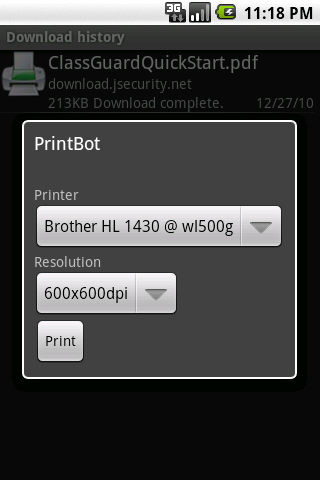
After waiting for years for such an app , I can finally print to my old ( Hp laserjet pro P1102 ) which is connected to my dd-wrt router using usb cable , great job !! , I just hope i could select the printing resolution , as i think the printer defualt speed is at low speed high quality mode .
Works with my old Brother printer. Would like to upgrade, BUT: not obvious how, the Pro app doesn't show up for me in the Store, email to support (about giving them money!) went unanswered. Not inspiring confidence.
Kirimkan komentar
Untuk memberikan komentar, masuklah dengan jejaring sosial Anda:
Atau tinggalkan komentar anonim. Komentar Anda akan dikirim untuk dimoderasi.
Kirimkan komentar
Untuk memberikan komentar, masuklah dengan jejaring sosial Anda:
Atau tinggalkan komentar anonim. Komentar Anda akan dikirim untuk dimoderasi.